Local video generation keeps gaining ground on cloud tools. HunyuanVideo 1.5 in ComfyUI (Tencent, open-source, 8.3B parameters) adds one more option to what we’ve already covered on ComfyLab (Wan 2.1/2.2, LTXV-2.3): an I2V “step-distilled” variant designed specifically to run in very few steps on consumer GPUs. This article documents an installation and run verified on July 5, 2026, with real timings measured on a 24GB RTX 3090.
Unlike the official announcements, here you’ll find concrete data: how many seconds it actually takes, exactly which models to download, and how to avoid the errors that block most users on their first attempt.
At a Glance: Technical Specifications
| Aspect | Value |
|---|---|
| Model | HunyuanVideo 1.5 I2V step-distilled |
| GPU tested | RTX 3090 (24GB VRAM) |
| Total time | 290 seconds (~4.8 minutes) |
| Output resolution | 848×480 pixels |
| Video duration | 5.04 seconds (121 frames @ 24fps) |
| Sampler steps | 12 (cfg=1, shift=5) |
| Minimum VRAM requirement | 24GB |
What HunyuanVideo 1.5 Is and Why It Matters
HunyuanVideo 1.5 is a lighter version (8.3B parameters) than the original HunyuanVideo we already covered on ComfyLab. It includes a step-distilled variant designed to run in 8-12 sampler steps, instead of the many more steps that non-distilled diffusion models need.
The model offers two main modes:
- T2V (Text-to-Video): generates video from text (not tested in this session)
- I2V (Image-to-Video): animates a still image (the variant used in this test)
There’s also a lightx2v_4step LoRA designed to speed up the T2V variant even further down to 4 steps — also not tested here. This guide focuses on the I2V 480p step-distilled variant, the most accessible one for 24GB GPUs.
💡 Tip: HunyuanVideo 1.5 step-distilled is viable on an RTX 3090 precisely because it reduces the sampler to 12 steps, which in this test translated to ~5 minutes per short video with no visible artifacts.
Requirements and Prerequisites
Before downloading anything, verify you have:
- ComfyUI: a recent version (tested with a July 2026 build)
- VRAM: 24GB minimum (RTX 3090, RTX 4090, RTX 5090, or equivalent)
- Disk space: several GB per model (the main text encoder, Qwen2.5-VL 7B, weighs 8.7GB on its own)
- Internet connection: models are downloaded from HuggingFace
- Python 3.10+: required to run ComfyUI
Update ComfyUI to the latest version:
cd ComfyUI
git pull origin master
pip install -r requirements.txt
If you use conda, make sure the environment is activated before running the commands above.
How to Install HunyuanVideo 1.5: Exact Models to Download
All models come from the official Comfy-Org/HunyuanVideo_1.5_repackaged repository on HuggingFace. The key is picking the fp8_scaled variants (not fp16) to fit within 24GB of VRAM.
Model Table for I2V 480p
| File | Destination | Purpose |
|---|---|---|
qwen_2.5_vl_7b_fp8_scaled.safetensors (8.7GB) | models/text_encoders/ | Main text encoder |
byt5_small_glyphxl_fp16.safetensors | models/text_encoders/ | Secondary text encoder |
hunyuanvideo15_vae_fp16.safetensors | models/vae/ | Variational Autoencoder |
hunyuanvideo1.5_480p_i2v_step_distilled_fp8_scaled.safetensors | models/diffusion_models/ | Diffusion UNet (I2V, fast variant) |
sigclip_vision_patch14_384.safetensors (from Comfy-Org/sigclip_vision_384) | models/clip_vision/ | CLIP Vision, needed to condition the I2V with the starting image |
We could only precisely verify the size of the main text encoder (8.7GB); we didn’t measure the rest of the files individually in this test, so we’re not making up numbers for them here.
Models Available but Not Covered in This Guide
The same repository has additional options we didn’t test:
hunyuanvideo1.5_480p_t2v_cfg_distilled_fp8_scaled.safetensorsfor T2Vhunyuanvideo1.5_t2v_480p_lightx2v_4step_lora_rank_32_bf16.safetensorsfor ultra-fast generation (LoRA, 4 steps)- 720p variants and the 1080p_sr_distilled upscaler
They weren’t tested because this guide focuses on I2V 480p; we don’t give sizes or timings for them because we didn’t measure them — each variant behaves differently on GPU, so an unmeasured figure would be more noise than help.
Step-by-Step Installation: From Scratch
Step 1: Create the Folder Structure
mkdir -p ComfyUI/models/text_encoders
mkdir -p ComfyUI/models/vae
mkdir -p ComfyUI/models/diffusion_models
mkdir -p ComfyUI/models/clip_vision
Step 2: Download the Models
The simplest way is to use huggingface-hub:
pip install huggingface-hub

huggingface-cli download Comfy-Org/HunyuanVideo_1.5_repackaged \
  qwen_2.5_vl_7b_fp8_scaled.safetensors \
  --local-dir ComfyUI/models/text_encoders/

huggingface-cli download Comfy-Org/HunyuanVideo_1.5_repackaged \
  byt5_small_glyphxl_fp16.safetensors \
  --local-dir ComfyUI/models/text_encoders/

huggingface-cli download Comfy-Org/HunyuanVideo_1.5_repackaged \
  hunyuanvideo15_vae_fp16.safetensors \
  --local-dir ComfyUI/models/vae/

huggingface-cli download Comfy-Org/HunyuanVideo_1.5_repackaged \
  hunyuanvideo1.5_480p_i2v_step_distilled_fp8_scaled.safetensors \
  --local-dir ComfyUI/models/diffusion_models/

huggingface-cli download Comfy-Org/sigclip_vision_384 \
  sigclip_vision_patch14_384.safetensors \
  --local-dir ComfyUI/models/clip_vision/
Manual alternative: download from huggingface.co/Comfy-Org/HunyuanVideo_1.5_repackaged and place the files in the corresponding folders.
Step 3: Verify the Installation
The nodes HunyuanVideo 1.5 needs (HunyuanVideo15ImageToVideo, DualCLIPLoader, CLIPVisionLoader, etc.) are native to ComfyUI — you don’t need to install any custom node, just have a recent enough ComfyUI build to include them. If your install is old, update before continuing.
Verify the .safetensors files are in their correct folders:
ls -lh ComfyUI/models/text_encoders/
ls -lh ComfyUI/models/vae/
ls -lh ComfyUI/models/diffusion_models/
ls -lh ComfyUI/models/clip_vision/
HunyuanVideo 1.5 480p Workflow: Configuration and Parameters
The official video_hunyuan_video_1.5_720p_i2v.json template ships with ComfyUI. Here’s the real adaptation used in this test:
Key Workflow Nodes
- DualCLIPLoader (type
hunyuan_video_15): loads both text encoders in a single node,qwen_2.5_vl_7b_fp8_scaled.safetensorsandbyt5_small_glyphxl_fp16.safetensors - CLIPVisionLoader + CLIPVisionEncode: load
sigclip_vision_patch14_384.safetensorsand condition the model with the starting image - UNETLoader and VAELoader: load the I2V diffusion model and the VAE
- LoadImage: loads the starting image from
ComfyUI/input/ - HunyuanVideo15ImageToVideo: builds the conditioned video latent from the image and the prompt
- ModelSamplingSD3, KSamplerSelect, BasicScheduler, RandomNoise, CFGGuider, and SamplerCustomAdvanced: the advanced sampling chain used by the official template (instead of a single simple KSampler node)
- VAEDecode and CreateVideo / SaveVideo: decode the latent and save the final MP4
Sampler Parameters for Step-Distilled
cfg_scale: 1.0
shift: 5.0
steps: 12
sampler: "euler"
scheduler: "simple"
These are the values recommended by the official template’s own MarkdownNote node for the step-distilled variant, and the ones used in this test with good results. We didn’t test variations (steps below 12 or a cfg other than 1), so we can’t share data on what happens if you deviate from them — use these values as a verified starting point.
Output resolution: 848×480 (the I2V 480p model is flexible on aspect ratio)
Frames generated: 121 frames at 24fps = 5.04 seconds of video
📌 Keep in mind: The step-distilled parameters (cfg=1, shift=5, 12 steps) are different from those of a non-distilled model. Use them exactly as indicated to get optimal results on an RTX 3090.
Real Performance on RTX 3090: Verified Data
Total Generation Time
290 seconds (4 minutes 50 seconds) from the start of the workflow to the final MP4.
This time includes both model loading (text encoders, UNet, and VAE) and sampling.
Breakdown by Sampler Step
ComfyUI’s log breaks pure sampling down to approximately 21.5 seconds per step. With 12 steps, that’s ~4.3 minutes (258s) of sampling alone. The remaining ~32 seconds correspond to loading the models before sampling starts — we didn’t measure how long each individual model takes to load separately, so we aren’t breaking that part down with more precision.
Comparison with Official Marketing
Tencent claims HunyuanVideo 1.5 step-distilled is “75% faster” than the standard variant. That figure is measured on an RTX 4090, not an RTX 3090. The 290 seconds reported here are the real number measured on the most common consumer hardware (RTX 3090) — it’s not a figure that confirms or contradicts the marketing claim, it’s simply a measurement on a different GPU than the one Tencent uses in its communications.
Result Quality: Visual Analysis
The generated video shows:
- Smooth motion: RGB light waves propagate left to right with no jumps
- Temporal coherence: the background lighting (blurred monitor) doesn’t flicker
- No visible artifacts: no deformations, ghosting, or frame blending
- Preserved depth of field: the keyboard stays in focus, the background stays blurred
The motion prompt was:
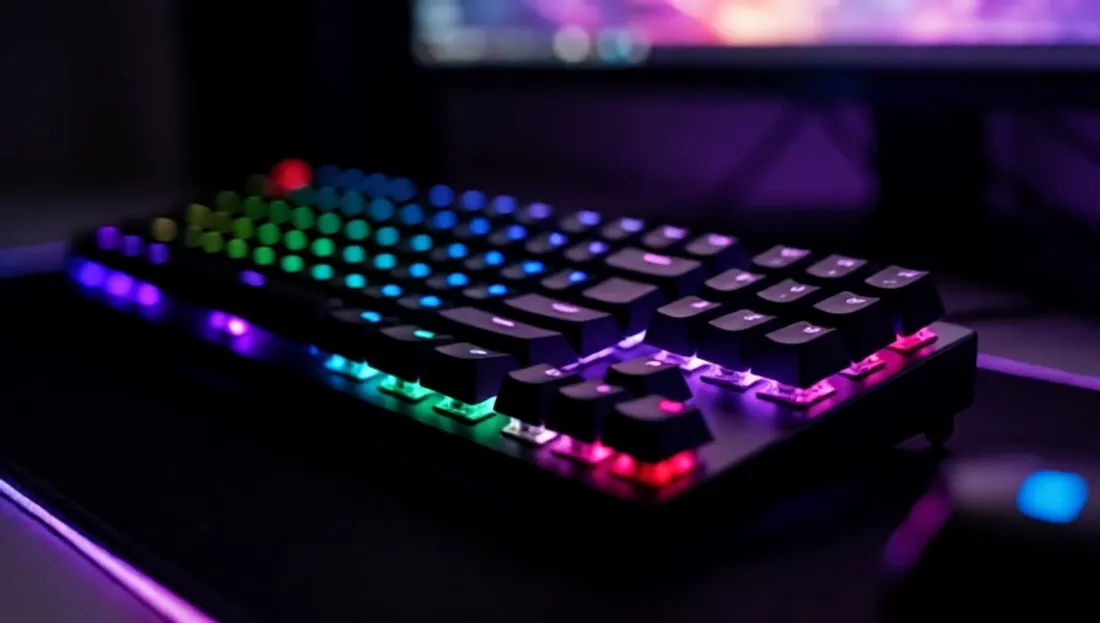
“A mechanical keyboard with purple and blue RGB backlighting on a dark desk at night. Waves of colored light ripple smoothly across the keycaps from left to right, pulsing gently. A monitor glows softly out of focus in the background. Cinematic, moody tech atmosphere, smooth continuous motion, high detail.”
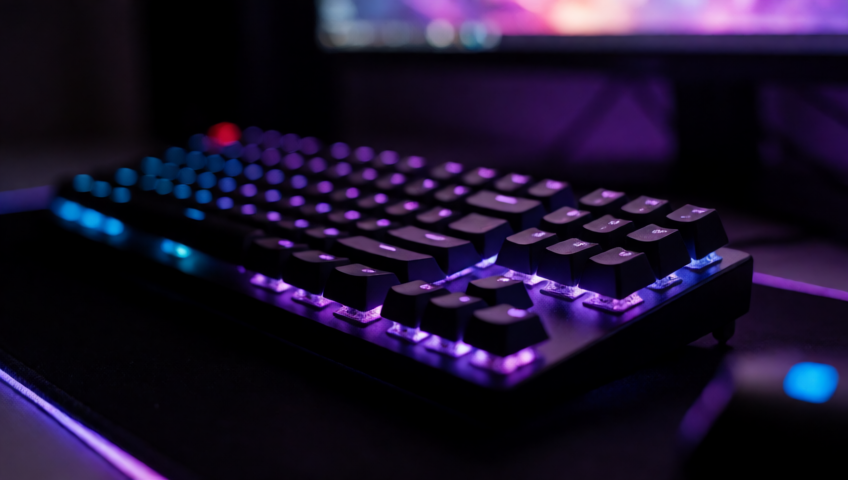 The starting frame, generated with Krea2 Turbo at 848×480 — compare it against the video above to judge for yourself how much detail the I2V animation kept.
The starting image was generated with Krea2 Turbo at 848×480, and HunyuanVideo 1.5 I2V animated it coherently without losing detail.
Troubleshooting: The LoadImage Bug (Verified Fix)
During the test, we found a real problem that blocks many users:
Problem: You generate an image with a SaveImage node (which writes to ComfyUI/output/), then try to use it as input in a LoadImage node for the I2V workflow. LoadImage doesn’t show it in the dropdown.
Reason: LoadImage only looks in ComfyUI/input/, not in output/.
Fix: Manually copy the generated image from output/ to input/ before running the I2V workflow:
cp ComfyUI/output/generated_image.png ComfyUI/input/Then it will show up in the LoadImage dropdown.
This detail is small but crucial if you’re planning a two-step pipeline (generate image → animate with I2V) inside ComfyUI.
💡 Practical tip: LoadImage looks in
input/, notoutput/. Manually copy generated images if you want to reuse them in later workflows.
Frequently Asked Questions
How long does HunyuanVideo 1.5 take to generate a video on an RTX 3090?
290 seconds (~4.8 minutes) for 5 seconds of video at 480p with the I2V step-distilled variant at 12 steps, including loading all the models (text encoder, UNet, and VAE). Pure sampling is about 21.5 seconds per step. This figure differs from Tencent’s official marketing, which is measured on an RTX 4090.
Which models do you need to run HunyuanVideo 1.5 480p I2V in ComfyUI?
From the Comfy-Org/HunyuanVideo_1.5_repackaged repository on HuggingFace: qwen_2.5_vl_7b_fp8_scaled.safetensors and byt5_small_glyphxl_fp16.safetensors as text encoders, hunyuanvideo15_vae_fp16.safetensors as the VAE, and hunyuanvideo1.5_480p_i2v_step_distilled_fp8_scaled.safetensors as the diffusion model. The fp8_scaled variants fit comfortably in 24GB of VRAM.
Why can’t LoadImage find the image I just generated in ComfyUI?
The LoadImage node looks for files in the ComfyUI/input/ folder, not ComfyUI/output/, where SaveImage saves images by default. If you generate a starting image and want to use it in a second image-to-video workflow, you have to copy it manually to input/ before it shows up as an option in the LoadImage dropdown.
What sampler parameters does the step-distilled variant of HunyuanVideo 1.5 use?
cfg=1, shift=5, and 12 sampler steps, following the values recommended by the official ComfyUI template’s own node for this variant. These are very different values from a non-distilled model; don’t raise the cfg thinking it will improve the result.
Does HunyuanVideo 1.5 I2V work on an RTX 4080 or RTX 4070?
We haven’t tested it, but it’s unlikely without adjustments: the model is designed for 24GB of VRAM and an RTX 4080/4070 has 16GB. You’d need memory offloading techniques not covered in this test. What’s verified in this guide is the RTX 3090 (24GB).
Can I use the T2V variant instead of I2V?
Yes, hunyuanvideo1.5_480p_t2v_cfg_distilled_fp8_scaled.safetensors exists in the same repository, along with a lightx2v_4step LoRA designed to speed that variant up even further. Neither was tested in this session, so we don’t have timings or quality results for them.
Can I scale up to 720p or 1080p?
720p variants exist in the same repository, plus a 1080p_sr_distilled upscaler, but we didn’t test them in this session — we don’t know if they fit comfortably in 24GB or what generation times they’d have. They remain an unverified scaling path.
Keep Reading
If you want to see how other video models (LTXV-2.3, SCAIL-2, Wan 2.1/2.2) perform on this same RTX 3090, check out our 5 real local AI video tests.
Conclusion
🏆 Our Recommendation
HunyuanVideo 1.5 I2V step-distilled is the realistic option for animating images on consumer hardware without waiting hours. If you have an RTX 3090 and want to generate coherent 5-second videos in ~5 minutes, download the 5 models listed in this guide (including CLIP Vision, easy to forget), adapt the official workflow to the step-distilled parameters (cfg=1, shift=5, 12 steps), and watch out for the LoadImage bug. The 290 seconds per video is the real figure measured in this test, and the result quality was consistent with no visible artifacts.
If your GPU has less than 24GB, this variant as tested here isn’t viable without memory offloading techniques not covered in this guide.
Next steps in ComfyUI
Getting started
FAQ
- How long does HunyuanVideo 1.5 take to generate a video on an RTX 3090?
- 290 seconds (~4.8 minutes) for 5 seconds of video at 480p with the I2V step-distilled variant at 12 steps, including loading all the models (text encoder, UNet, and VAE). Pure sampling is about 21.5 seconds per step. This figure differs from Tencent's official marketing ('75% faster'), which is measured on an RTX 4090, not an RTX 3090.
- Which models do you need to run HunyuanVideo 1.5 480p I2V in ComfyUI?
- From the Comfy-Org/HunyuanVideo_1.5_repackaged repository on HuggingFace: qwen_2.5_vl_7b_fp8_scaled.safetensors and byt5_small_glyphxl_fp16.safetensors as text encoders, hunyuanvideo15_vae_fp16.safetensors as the VAE, and hunyuanvideo1.5_480p_i2v_step_distilled_fp8_scaled.safetensors as the diffusion model. The fp8_scaled variants fit comfortably in 24GB of VRAM.
- Why can't LoadImage find the image I just generated in ComfyUI?
- The LoadImage node looks for files in the ComfyUI/input/ folder, not ComfyUI/output/, where SaveImage saves images by default. If you generate a starting image and want to use it in a second image-to-video workflow, you have to copy it manually to input/ before it shows up as an option in the LoadImage dropdown.
- What sampler parameters does the step-distilled variant of HunyuanVideo 1.5 use?
- cfg=1, shift=5, and 12 sampler steps, following the values recommended by the official ComfyUI template's own MarkdownNote for this variant. These are very different values from a non-distilled model -- don't raise the cfg thinking it will improve the result.