A small YouTube channel (smaller than what usually gets on our radar — we saw it because someone sent it to us directly) published a face+body swap tutorial for MiniMax H3 inside ComfyUI, no ReActor and no insightface — just SAM3 to track the subject, a node pack called MaskVidExperiments to crop-generate-paste, and ComfyUI’s native Reference-to-Video (Ref2VA) model. The interesting part: the creator published the exact workflow, reference images, and source videos they used, for free, in their own HuggingFace repository. We didn’t have to guess anything about the graph — we downloaded it as-is and ran it on our RTX 3090.
The face really does change, clearly and verifiably — we confirmed it by comparing side by side with the original video, and then repeated the whole thing with a source video generated entirely by us to rule out the result depending on that specific material. The body doesn’t change in either case. And “download as-is” didn’t mean “run as-is” either: we didn’t have the checkpoint the workflow asked for, we used a different turbo LoRA from the one it names, and we had to free up disk space before we could even start. All of that is documented below, with nothing glossed over.
⚠️ Responsible use note: this workflow replaces a person’s facial identity in a video. Only use it with your own material or with the explicit consent of the person represented — the reference images and source video we used in the first test are the ones the creator themself published openly so others could reproduce their tutorial, and in the second test we generated a synthetic identity of our own specifically to avoid depending on any real person’s image.
At a glance
| Aspect | Details |
|---|---|
| Base model | MiniMax H3 REF2VA INT8 ConvRot (minimax_h3_ref2va_pruned_int8_convrot.safetensors, ~21GB) |
| Masking pipeline | SAM3 (sam3.1_multiplex_fp16) for tracking + MaskVidExperiments (drozbay, 174+★ and climbing) for crop/mask/paste |
| Test GPU | RTX 3090 24GB — a single GPU, not generalizable |
| Sampler parameters | Seed 123 (fixed), 8 steps, cfg 1, er_sde, simple — unchanged from the original |
| Swap time (creator’s assets) | 7 min 18 s (438.5 s per ComfyUI’s history.json) |
| Swap time (self-generated video) | 6 min 18 s (378 s) — faster, shorter output (209 vs. 226 frames) |
| Self-generated video pipeline | Krea2 turbo portrait (181 s) + MiniMax H3 FL2VA I2V animation (196 s, 22GB VRAM peak) + swap (378 s, 23.2GB VRAM peak) |
| Real VRAM peak | 23.2GB of 24GB during the swap — tight margin, no OOM in either test |
| Result | Real face swap, verified TWICE (creator’s assets + 100% self-generated video); body, clothing, and background do NOT change (SAM3 only detects “head”); overlaid text in the original scene comes out distorted |
Origin: the creator published the workflow themself, we didn’t reconstruct it
The video links directly to their HuggingFace repository with two folders — Workflow-1 (the one we test here) and Workflow-2 (more advanced, with more mask control, which the creator leaves for a future video if there’s enough interest). From there we downloaded: the full graph (Workflow-1-updated.json, 65 nodes), two reference images of the same person (one front-facing, one three-quarter), and four test source videos.
We traced the graph node by node before touching anything. The two reference images don’t enter as two separate model inputs — an ImageStitch node (side="right") stitches them into a single composite image that feeds the only ref_image_0 slot the MiniMaxH3ReferenceToVideo node actually has wired up in this workflow. We also found a LoadImage (Old-Man.png) that feeds into an auxiliary branch whose output isn’t used in the final result — no effect on the generated video, probably a leftover from an earlier test by the creator that stayed saved in the JSON.
What the workflow asked for, and what we had to substitute
Three files from the original graph weren’t installed in our ComfyUI:
minimax_h3_ref2va_pruned_int8_convrot.safetensors(~21GB) — the core of the test. We downloaded it as-is from the officialComfy-Org/MiniMax-H3repository, no substitution. It’s a different model from the FL2VA we already had installed from our earlier MiniMax H3 article — they’re not interchangeable, REF2VA and FL2VA are fine-tunes for different tasks.- Text encoder: the graph asked for
qwen3vl_32b_minimax_h3_nvfp4_awq.safetensors(15.7GB, not installed). We already hadqwen3vl_32b_minimax_h3_int8_convrot.safetensorsfrom our earlier article — same encoder family, different quantization — and reused it instead of downloading another 15.7GB. - Turbo LoRA: the graph asked for
minimax_h3_fl2v_lightx2v_turbo_8step_v1.0_resized_avg_rank_24_bf16.safetensors. We only looked for it inComfy-Org/MiniMax-H3andlightx2v/Minimax-h3-Turbo, didn’t find it there, and used the REF2V-specific 8-step turbo LoRA fromlightx2v/Minimax-h3-Turboinstead, keeping theKSampler’s original 8 steps untouched.
Correction (2026-10-26): the first version of this article said that file didn’t exist in any public repository. That was wrong. It is in the
loras/folder of Kijai/MiniMax-H3_comfy (~365MB, uploaded 2026-08-13, three weeks before this test). Note that it’s an FL2V LoRA while this workflow runs a REF2VA checkpoint, so the REF2V file we used is arguably the closer match anyway.
- BiRefNet (424MB): a note in the workflow itself called it optional (“use whichever detection technique you prefer, SAM3 or Mediapipe”), but ComfyUI’s validator required it anyway to load the full graph. We downloaded it from the official
Comfy-Org/BiRefNetrepository.
Before downloading any of this, our disk was at 95% usage (25GB free) — not enough safety margin for a 21GB file. We freed up 41GB by deleting three unused Ollama models sitting idle for three months (qwen3:30b, a Cydonia-24B GGUF, and qwen2.5:14b), none related to this test. Without that step first, we wouldn’t have been able to complete the test with a safe margin.
Round two: we repeated everything with a 100% self-generated source video
A single test with someone else’s material leaves one question open: does the swap work because the pipeline is solid, or because that specific video (that face, that lighting, that pose) was an easy case? To rule that out, we generated our own source video from scratch, in our own ComfyUI, without touching anything from the creator’s repository:
- Base portrait with local Krea2 turbo (
krea2_turbo_fp8_scaled.safetensors, 8 steps, cfg 1) — a generic man in his late twenties, plain gray t-shirt, medium shot, neutral studio background. 181 seconds. - Image-to-video animation with the native
MiniMaxH3ImageToVideonode — using the FL2VA checkpoint we already had installed from our earlier MiniMax H3 article, no new downloads needed. Simple prompt: the person turns their head slightly and blinks once, static camera, no cuts — exactly what the original video recommends for a source video that works well with this pipeline. 196 seconds, 22GB VRAM peak, output of 226 frames (9.42s). - The same swap, same graph, same reference images (
Girl-left.png+Girl-Right.png), same seed 123 — changing only the source video. 378 seconds, 23.2GB VRAM peak, output of 209 frames (8.71s).
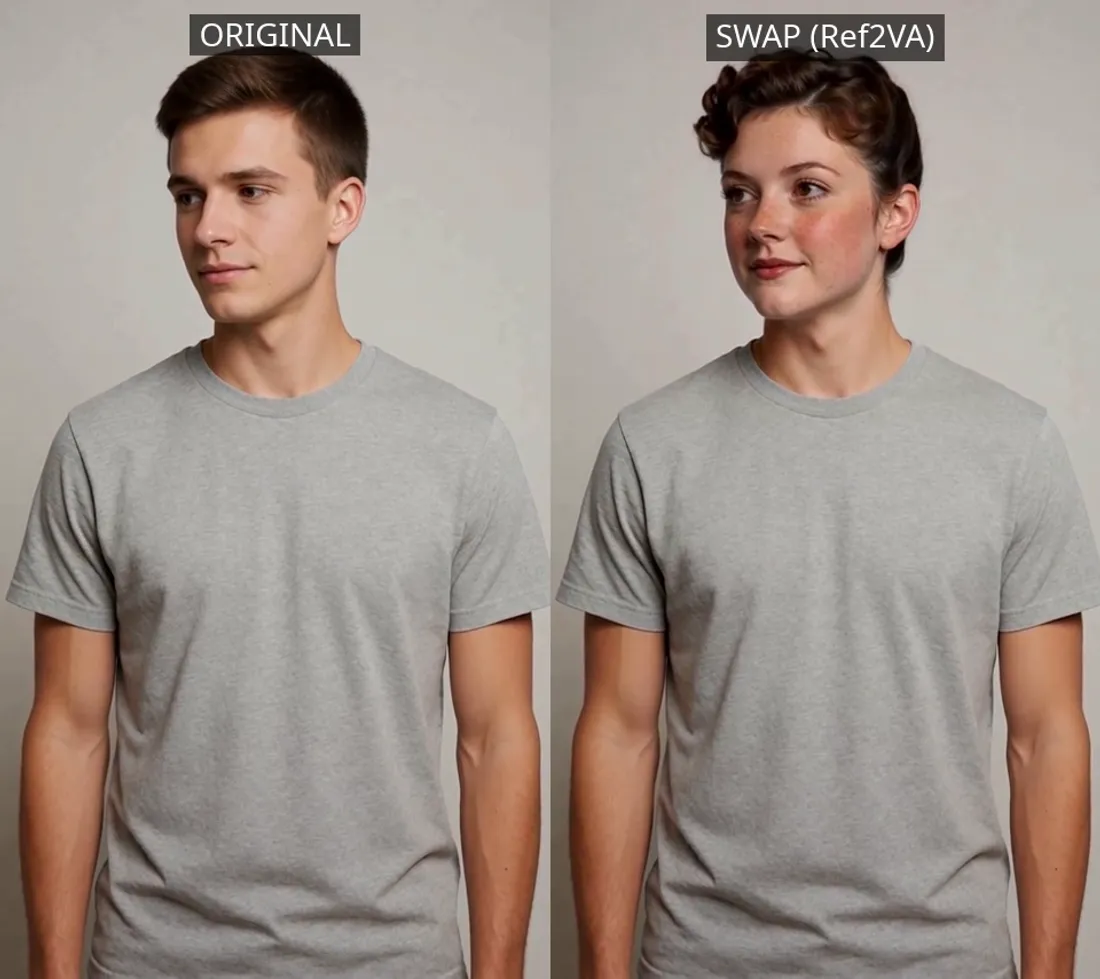
Our source video (left, a man generated with Krea2 and animated with MiniMax H3) against the swap result (right). We deliberately changed the person’s gender too — so there’s no way to mistake “looks a bit similar” for “actually changed”. The gray t-shirt, pose, head turn, and background are identical on both sides; verified across 3 frames spread through the clip (start, middle, end), not just one.
The result is unambiguous: the face changes completely toward the reference’s female identity — curly brown hair, freckles, face shape — on top of a body, clothing, and motion that are exactly what we generated ourselves. With material where we control every step, this confirms the same thing we’d already seen with the creator’s assets: real face swap, body untouched.
First test: with the creator’s exact assets
Original (left) vs. result (right), using the Video-1.mp4 and reference images the creator themself published. Same pattern as with our own material: only the face changes — hair, skin tone, freckles — everything else (hand pose, jacket, chains, belt, jeans, background) shows no appreciable change frame by frame.
Digging into the graph, we found out why: the CLIPTextEncode node feeding SAM3’s detection carries the literal text "head" — this specific workflow crops and regenerates only the head, not the body, in both tests we ran.
Honest conclusion: both tests demonstrate face swap, not body swap, despite the video and workflow we reproduced being advertised as “face + body swap”. Workflow-2 (more advanced, untested by us) might actually touch the body — we leave that as an explicit open item further below.
Final result after the uncrop, at full size: 226 frames at 24fps (9.42s), seed 123, the original creator’s own prompt (“<Subject 1> is the character represented in <Picture 1>. The video is a close up face of <Subject 1>.”).
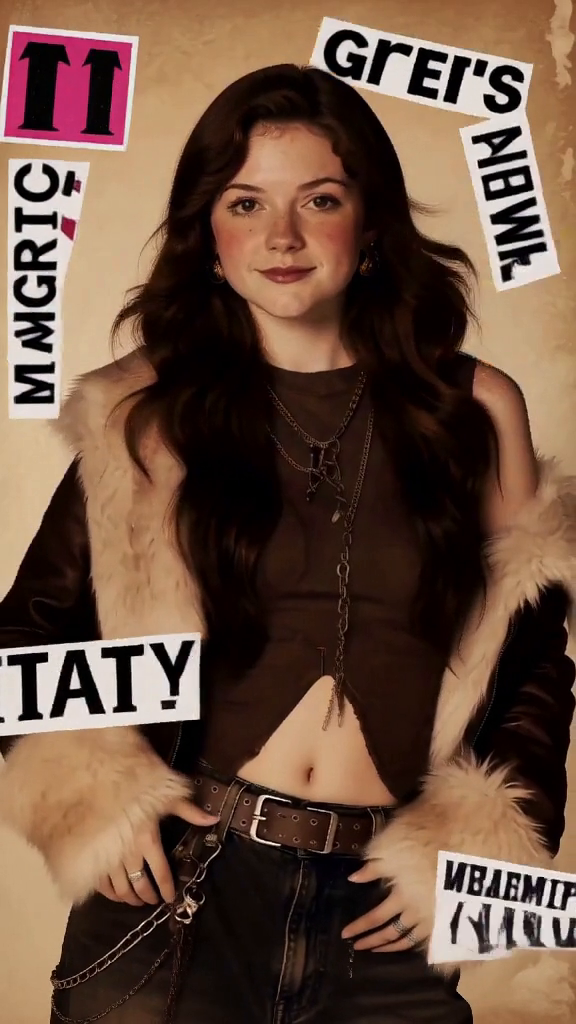
The real failure: in frames where the source video has overlaid text stickers, the text comes out with mirrored or distorted letters — a known limitation of AI video models in general, not specific to this swap.
We also kept the intermediate output, before MVEx_SubjectUncrop pastes it back into the full frame — useful if you want to understand what working resolution the pipeline actually uses inside the crop:
Direct sampler output, before the uncrop — the working region cropped by MaskVidExperiments, not the full frame.
VRAM and time: tight margin, nothing to spare
23.2GB of 24GB available on the RTX 3090 in both swap tests — it worked, but with no room for much else. If your card has 24GB but you also have something else loaded in VRAM (a browser with lots of tabs, another generation process), it’s reasonable to expect an OOM with this specific pipeline. Real generation time was 7 min 18 s with the creator’s assets and 6 min 18 s with our own video — both confirmed from ComfyUI’s history.json, not a console estimate. Counting the full pipeline for generating your own source video (portrait + animation + swap), that’s about 12-13 minutes start to finish on an RTX 3090. Zero errors or tracebacks in the server log during either swap run.
Limitations of this test
- A single GPU (RTX 3090), one seed per test — no statistical repetition within each run (we did repeat the full test twice with different material, which is what surfaced the frame-count pattern).
- We didn’t test Workflow-2 (more advanced, more mask control) that the creator mentions in their video — they leave it for a future video of their own, and we’re leaving it as a pending item for a future article of ours. It’s our main candidate for checking whether real body swap exists anywhere in this pair of workflows.
- We only verified the body does NOT change with two specific source videos (one third-party, one our own), both with the person relatively still and facing forward. We didn’t test with wide body movement, nor whether changing SAM3’s detection text from
"head"to something like"person"would trigger a full-body crop — we didn’t try it because that would have been a modification of the original graph, not an as-is reproduction. - Two of the three file substitutions (turbo LoRA and text encoder) mean this isn’t a byte-for-byte replica of the original video — it’s the most faithful reproduction possible with what publicly exists today, documented wherever it diverges.
- We didn’t isolate which specific substitution explains the frame-count difference (226 vs. 243 with the creator’s assets, 209 vs. 226 with our own) — our strongest hypothesis is the LoRA, reinforced by showing up in both tests, but it’s not a confirmed cause node by node.
- We only tested one of the four source videos the creator published (
Video-1.mp4) and a single self-generated video — we don’t know if the first video’s distorted-text failure shows up the same way in the creator’s other three.
Conclusion
The real workflow works, and it works well for half of what it promises: consistent, verifiable face swap — we confirmed it twice, with third-party material and with a video we generated entirely ourselves, even changing gender to remove any ambiguity — using MiniMax H3’s native pipeline in ComfyUI, no ReActor or insightface needed. The other half of the title — “body swap” — we didn’t see in either test: the body, clothing, and background of the source video stay untouched, because this specific workflow detects and crops only the head. And “free and published by the creator” didn’t mean “ready to copy-paste” either — a third of the files it asked for weren’t where the original material said, and we had to manage disk space before we could even start.
🏆 Our recommendation
If what you’re after is changing only the face while keeping the original pose, clothing, and scene, this workflow delivers — we saw it compared frame by frame against the original, twice, with two different source videos. If you’re after a full body swap (changing build, outfit, etc.), this specific test doesn’t demonstrate it — you’d need the creator’s Workflow-2, which we haven’t tested yet. If you already have MiniMax H3’s FL2VA checkpoint installed, don’t assume it works here — this workflow specifically needs REF2VA, that’s 21GB more, and before starting the download make sure you genuinely have 25GB free, not just enough for the file itself. And if you want to verify this with your own face, or someone else’s with consent, the full pipeline (local portrait + I2V animation + swap) takes about 12-13 minutes on an RTX 3090.
Keep Reading
If this is your first time touching MiniMax H3 in ComfyUI, start with our Sage Attention and Sol-Attn test on RTX 3090 — that one covers the base install and a real duplication bug in the latent upscale. If this article’s VRAM margin (23.2GB of 24GB) worries you for your own card, check our ComfyUI VRAM reduction guide. And if you want to squeeze out fast action in your own generations, we compared Alibaba PAI’s 8-step PDD Acc LoRA against the 4-step turbo we used here. If you need videos longer than a single segment, we tested Motion Director for chaining segments with continuity.
Next steps in ComfyUI
Getting started
More video and image AI workflows
- Wan 2.2 in ComfyUI: image-to-video Dual-model MoE architecture, VRAM requirements and real output.
- HunyuanVideo 1.5 in ComfyUI Real install of the I2V 480p step-distilled variant on an RTX 3090.
- 5 local AI video models tested on one RTX 3090 LTXV-2.3, SCAIL-2, Wan 2.1 and Wan 2.2, all benchmarked on the same hardware.
FAQ
- Why repeat the test with a self-generated video if it already worked with the creator's?
- Because a single test with someone else's material leaves open the question of whether the result depends on that specific video (lighting, pose, a starting face already close to the reference, etc.). We generated our own portrait with Krea2 turbo, animated it with MiniMax H3 image-to-video, and ran the same swap on it -- with a gender change thrown in so there's no visual doubt at all. The result showed the same pattern: face replaced, body and background untouched.
- Is this face swap, body swap, or both?
- Face swap only, verified twice. This workflow's SAM3 detection node (`CLIPTextEncode` with the text "head") specifically targets the head, and both side-by-side comparisons confirm it: with the creator's assets, the face changes but the jacket, jewelry, belt, and background are identical frame by frame; with our own video (a male-to-female swap), the gray t-shirt and studio background stay exactly the same. The original video's title promises "face + body swap", but this specific workflow (Workflow-1) doesn't demonstrate it in either test -- Workflow-2, more advanced and untested by us, might actually touch the body.
- Do you need to upload two reference images (front + 3/4)?
- The real graph uses two LoadImage nodes that an ImageStitch node (side="right") stitches into a single composite image before feeding it to the MiniMaxH3ReferenceToVideo node as one reference -- they aren't two separate model inputs, it's a pre-composition trick. We used the two reference images (front-facing and three-quarter) the creator published alongside the workflow.
- What's the difference between REF2VA and FL2VA, and why can't you use the checkpoint you already had?
- They're two models trained for different tasks: FL2VA conditions on a first/last frame (text or image to video), REF2VA conditions on a reference identity image that gets re-anchored in every segment. The `MiniMaxH3ReferenceToVideo` node specifically requires REF2VA weights -- they're not interchangeable, we had to download the 21GB REF2VA checkpoint even though we already had FL2VA installed from an earlier article.
- Why does the output frame count never match what was requested?
- It happened in both tests: 226 frames instead of 243 with the creator's assets, and 209 instead of 226 with our own video -- a consistent pattern, not a one-off glitch. Our strongest hypothesis is still the substituted turbo LoRA (we used an official REF2V alternative from `lightx2v/Minimax-h3-Turbo` instead of the FL2V file the graph names), but we haven't isolated it node by node -- it's a correlation observed twice, not a confirmed cause.
- What actually breaks in the result?
- Text overlaid in the scene (some collage-style stickers in the source video) comes out with distorted or mirrored letters in several frames -- a known, documented limitation of AI video models in general, not something specific to this workflow or the swap itself. We checked this by sampling 3 frames spread across the whole clip, not just the first one.
- Did you actually have to free up disk space to run this?
- Yes, for real: the REF2VA checkpoint (21GB) didn't fit with a safe margin on a disk at 95% usage. Before downloading anything we freed 41GB by deleting three unused Ollama models sitting idle for 3 months (qwen3:30b, Cydonia-24B, qwen2.5:14b) -- none related to ComfyUI, pure housekeeping.