A YouTube video went viral showing LTXV-2.3 generating a 10-second boxing-gym scene with embedded ambient audio—then upscaling it to 4K using Nvidia’s RTX Video Super Resolution in ComfyUI. I grabbed the public workflow JSONs, ran them exactly as-is on my RTX 3090, and documented everything: generation times, VRAM usage, model downloads, and the three critical gotchas that broke the workflow on first load. Here’s what actually happened, with real data from a real 24GB card.
LTXV-2.3’s ComfyUI pipeline chains two separate workflows. The first is a distilled 22B transformer that generates 1920×1024 video at 25fps with synchronized audio in under 8 minutes. The second pipes that output through Nvidia’s RTX Video Super Resolution upscaler to reach 4K (3840×2160) in under 3 minutes. Both workflows are reproducible, both work on consumer hardware, and both have hard requirements that catch most first-time users off guard.
At a Glance: LTXV-2.3 + RTX SR Workflow
| Aspect | Details |
|---|---|
| Total time | ~11 minutes (7.7 min text-to-video + 2.9 min upscale) |
| Peak VRAM | 22.9GB (24GB card required) |
| Output resolution | 3840×2160 (4K) |
| Output duration | ~10 seconds at 25fps |
| Model download size | 31.5GB (beyond base ComfyUI-LTXVideo) |
| Text-to-video output | 1920×1024, 25fps, h264 + AAC audio |
| GPU requirement | RTX 3090, 4090, or equivalent 24GB+ card |
| Custom nodes needed | ComfyUI-GGUF, comfyui-kjnodes, Nvidia_RTX_Nodes |
The Two-Stage Pipeline: What We’re Building
Both workflows are real and reproducible. The first—LTXV-2.3’s text-to-video-with-audio stage—runs a distilled 22B transformer that generates 1920×1024 video at 25fps with synchronized audio. The second pipes that output through Nvidia’s RTX Video Super Resolution upscaler to reach 4K (3840×2160). Most first-time users hit hard requirements that break the workflow before they even see the progress bar.
Workflow 1: LTXV-2.3 Text-to-Video with Audio Generation
A quantized text encoder (Gemma-3-12B via GGUF) encodes your prompt into embeddings, then the model runs a two-stage diffusion process: base resolution sampling at 768×512 (which upsamples internally to 1920×1024), followed by a 2× latent-space refinement pass. The output is a joint audio/video latent that gets split, decoded separately, and muxed into a single mp4 file with both tracks intact.
The LTXV-2.3 ComfyUI workflow graph looks like this:
- DiffusionModelLoaderKJ → loads the distilled transformer (the mxfp8_block32 quantized variant)
- DualCLIPLoaderGGUF → loads Gemma-3-12B quantized text encoder
- Two CLIPTextEncode nodes → positive and negative prompts
- LTXVScheduler → builds sigma schedule (8 steps, max_shift 2.05, base_shift 0.95)
- First SamplerCustomAdvanced → base resolution pass (768×512, 251 frames)
- LTXVLatentUpsampler → 2× spatial upscale in latent space
- Second SamplerCustomAdvanced → refinement (3 steps, ‘Upscale Sampling 2x’ mode)
- LTXVSeparateAVLatent → splits audio and video latents
- VAEDecodeTiled + LTXVAudioVAEDecode → decodes both streams
- VHS_VideoCombine → muxes into mp4
🏗️ Workflow: LTXV-2.3 (1.1) T2V with audio
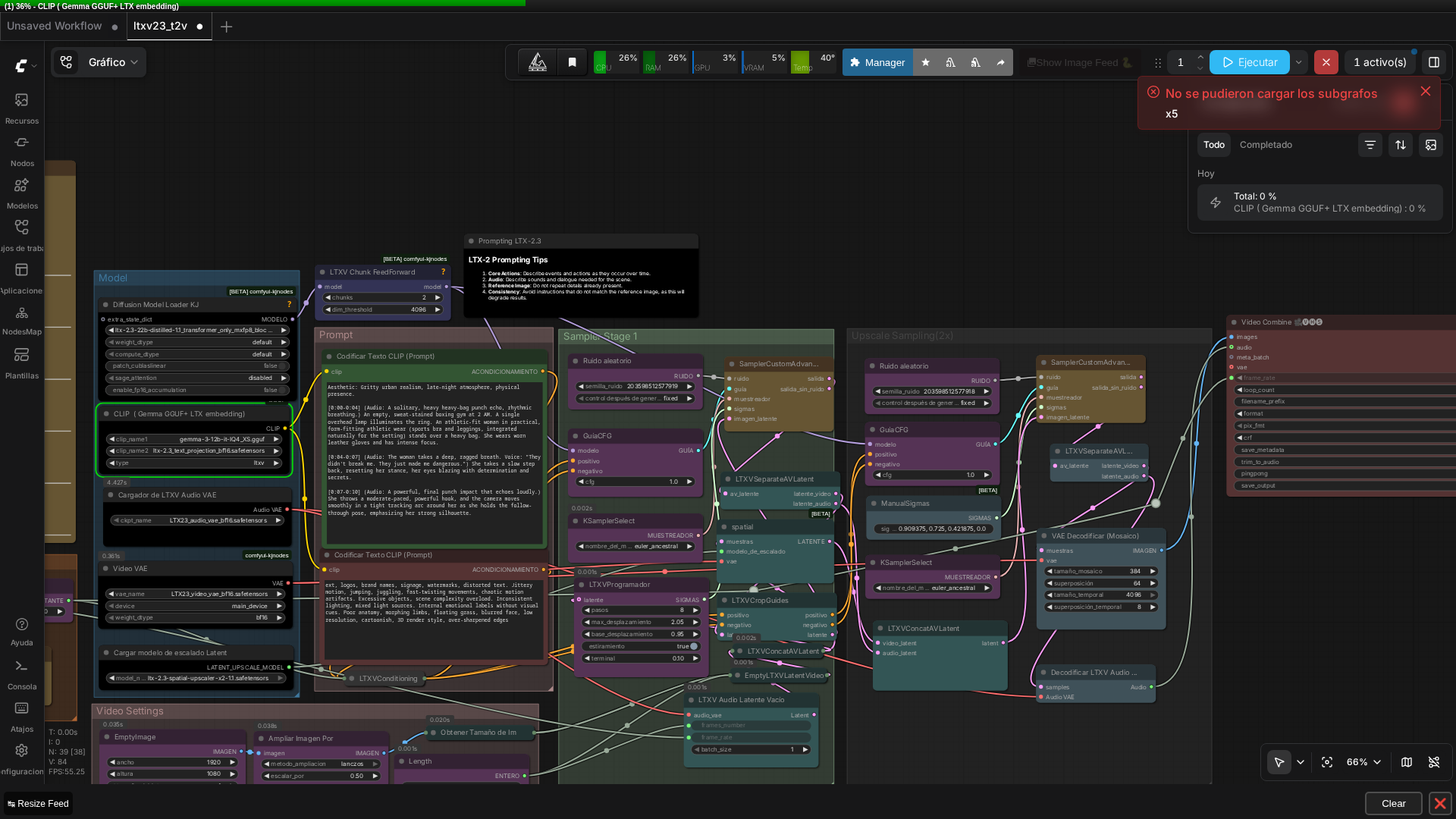 Real screenshot of the full graph (15+ nodes) running in ComfyUI v0.27.0.
👉 Quick takeaway: The LTXV-2.3 text-to-video workflow uses a two-pass diffusion approach (base + refinement) to generate coherent 10-second videos with embedded audio, all decoded and muxed into a single file.
Workflow 2: RTX Video Super Resolution Upscaling
This one’s straightforward:
- VHS_LoadVideo → reads the mp4 from workflow 1
- RTXVideoSuperResolution → upscales to 3840×2160 in ULTRA quality mode
- VHS_VideoCombine → writes the 4K output
RTX Video Super Resolution performs pure spatial upscaling without frame interpolation, making it a fast final step for the generated video.
👉 Quick takeaway: RTX Video Super Resolution is a lightweight spatial upscaler that doubles resolution without adding frames—crucial to understand before queuing, since it affects your output frame rate.
The Model Downloads: 31.5GB of New Files
Before you queue anything, you need to download models. If you already have a working ComfyUI-LTXVideo setup, these are all new:
| Model | Size | Source | Destination |
|---|---|---|---|
| gemma-3-12b-it-IQ4_XS.gguf | 6.55GB | unsloth/gemma-3-12b-it-GGUF (HF) | models/text_encoders/ or models/clip/ |
| ltx-2.3-22b-distilled-1.1_transformer_only_mxfp8_block32.safetensors | 24GB | Kijai/LTX2.3_comfy | models/diffusion_models/ |
| ltx-2.3-spatial-upscaler-x2-1.1.safetensors | 996MB | Lightricks/LTX-2.3 | models/latent_upscale_models/ |
| LTX23_audio_vae_bf16.safetensors | 365MB | Kijai/LTX2.3_comfy | models/checkpoints/ (see Gotcha #1) |
| ltx-2.3_text_projection_bf16.safetensors | 1GB | Kijai/LTX2.3_comfy | models/text_encoders/ |
| LTX23_video_vae_bf16.safetensors | 1.45GB | Kijai/LTX2.3_comfy | models/vae/ |
💡 Why the mxfp8_block32 variant matters: RTX 30-series cards (Ampere architecture) don’t have native FP8 tensor-core matmul instructions—those arrived with Ada Lovelace (RTX 40xx). The mxfp8_block32 quantization runs the same distilled 22B model on standard BF16 tensor cores instead, with near-identical quality to fp8_scaled. Using the plain fp8_scaled variant on a 3090 will either fail or silently fall back to slow emulation. This is the correct choice for a 30-series card, and it matters for both speed and stability.
Real Generation Numbers on RTX 3090 24GB
Total prompt execution time for the full LTXV-2.3 ComfyUI workflow: 463.39 seconds (~7.7 minutes) for the complete text-to-video generation.
Breakdown:
- Base-resolution sampling (8 steps): ~77 seconds. The first step includes ~25 seconds of model initialization and staging overhead; subsequent steps average ~9.7 seconds each.
- 2× latent-upscale refinement (3 steps): ~207 seconds total (~69 seconds per step). Each step is much heavier because the upsampled latent is larger.
- CLIP/Gemma text encoding, VAE decode, and audio decode overhead: absorbed in the above timings.
Peak VRAM: The LTXV-2.3 model alone staged 22,914MB—right at the edge of a 24GB card. This workflow is realistically 24GB-card-only. It doesn’t comfortably fit a 16GB card, and most 20GB cards will be too tight.
Output: 1920×1024, 25fps, 251 frames (~10 seconds total), h264 video + AAC audio muxed together, with genuinely coherent ambient audio (the prompt included boxing-gym sound cues, not dialogue lip-sync).
Real video generated with this exact workflow (the boxing-gym prompt included in the original JSON), unedited.
The RTX Video Super Resolution upscale was much faster: 175.88 seconds (~2.9 minutes) to upscale the entire 10-second video to 3840×2160 in ULTRA quality mode. The output was visibly sharper than the 1920×1024 source, with cleaner lighting gradients and no visible artifacts or ghosting on the moving figure.
Three Gotchas That Break First-Time Reproduction
Gotcha #1: The Audio VAE Loader Folder Quirk
LTXVAudioVAELoader is a native ComfyUI core node (in comfy_extras/nodes_lt_audio.py), not a custom node. But it hardcodes folder_paths.get_filename_list('checkpoints'), meaning it only scans the models/checkpoints/ folder, not models/vae/ where audio VAEs conventionally live.
Fix: Symlink (or copy) LTX23_audio_vae_bf16.safetensors into models/checkpoints/. Without this, the node shows “Value not in list” and the queue fails immediately.
Gotcha #2: Stale Custom Node Pack (comfyui-kjnodes)
On first load, ComfyUI’s frontend showed a persistent error toast “Could not load subgraphs” five times. Several nodes (LTXV Chunk FeedForward, the audio VAE loader, the second SamplerCustomAdvanced) rendered with wrong or generic dropdown options.
Root cause: The installed comfyui-kjnodes custom node pack was ~4 months out of date. LTX-2.3 support landed far more recently than the last commit in that repo. The workflow referenced node classes that didn’t exist yet in the installed version.
Fix: Run git pull in custom_nodes/comfyui-kjnodes (it was 240 commits behind), reinstall requirements.txt, and restart ComfyUI. After the update, the same workflow loaded and queued cleanly with real progress bars instead of error toasts.
Lesson: For very new models like LTXV-2.3, always check custom node freshness before assuming a workflow JSON is broken. A git pull takes 30 seconds and saves hours of debugging.
Gotcha #3: Git File-Mode False Positive
Pulling the kjnodes update was initially blocked by “please commit your changes or stash them.” Running git diff showed only file-mode changes (100644 → 100755) on dozens of unrelated files, not real edits.
Fix: Run git config core.fileMode false in that repo to ignore file-mode-only diffs. The pull proceeded safely after that.
⚠️ Important: Keep custom node packs updated with
git pull, especially for bleeding-edge models. File-mode conflicts are harmless—usegit config core.fileMode falseto skip them.
🏗️ Workflow: RTX Video Super Resolution (4K)
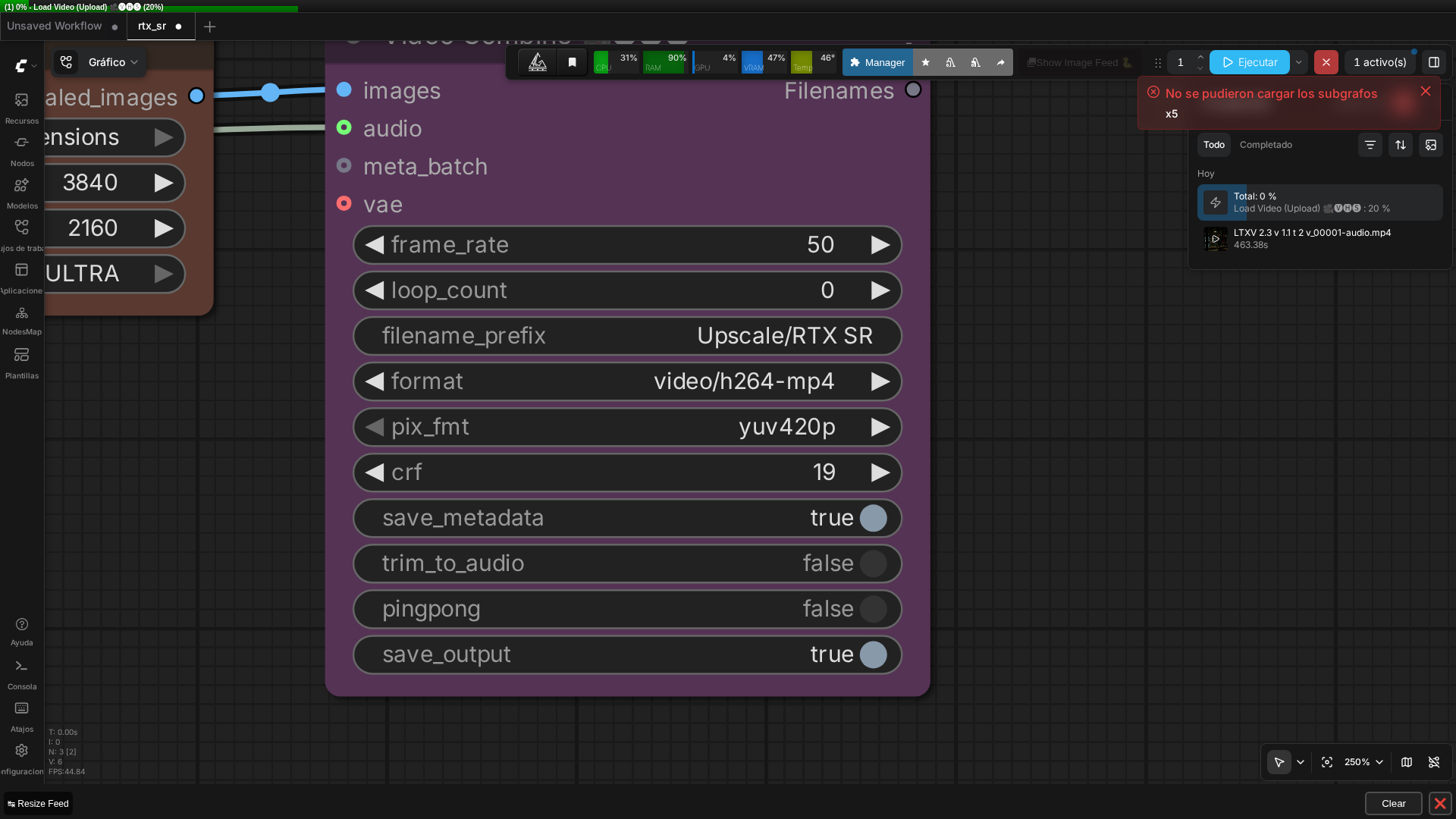 Real screenshot of the 3-node graph (VHS_LoadVideo → RTXVideoSuperResolution → VHS_VideoCombine).
The Frame-Rate Trap in the RTX SR Workflow
The downloaded RTX Video Super Resolution workflow’s VHS_VideoCombine node has frame_rate hardcoded to 50, but the source video from workflow 1 is 25fps. RTXVideoSuperResolution only does spatial upscaling—it doesn’t interpolate new frames. The output has the same frame count as the input but is told to play at 50fps instead of 25fps.
Result: The final 4K video plays at exactly 2× speed and is half the duration (4.98 seconds instead of ~10 seconds).
Real 4K output (note: plays at double speed due to the frame_rate bug explained above — runs ~5s instead of ~10s).
Fix before queuing: Manually reset VHS_VideoCombine’s frame_rate widget to match your source video’s actual frame rate. This is an easy trap that turns a 10-second video into a 5-second speed-up.
Custom Node and Environment Setup
Both workflows require these custom node packs:
- ComfyUI-GGUF (for DualCLIPLoaderGGUF) — install via ComfyUI-Manager
- comfyui-kjnodes (for LTXV nodes) — install via ComfyUI-Manager, then
git pullto get the latest - Nvidia_RTX_Nodes_ComfyUI (for RTXVideoSuperResolution) — install via ComfyUI-Manager
The nvidia-vfx Python package (required by RTXVideoSuperResolution) should already be present if you’ve run any other Nvidia node workflows. If not, ComfyUI-Manager’s install will pull it automatically.
ComfyUI version: Tested on v0.27.0. Older versions may have missing or incompatible node implementations.
Is This LTXV-2.3 Workflow Worth Running?
| Criterion | Assessment |
|---|---|
| Video quality | ✅ Excellent coherence, smooth motion, good audio sync |
| Speed | ✅ ~8 min text-to-video + ~3 min upscale = 11 min total |
| VRAM requirement | ❌ 24GB only; no headroom on 20GB cards |
| Setup complexity | ❌ 31.5GB downloads + 3 custom node packs + 3 gotchas |
| Ease of use | ❌ Frame-rate trap, audio VAE folder quirk, node version issues |
| Cost (compute) | ✅ Local, no API fees, one-time model download |
The good: LTXV-2.3’s distilled model genuinely produces good text-to-video with synchronized audio in under 8 minutes. The RTX Video Super Resolution upscale is fast (under 3 minutes) and clean at true 4K. Both workflows work exactly as advertised on a 24GB card.
The bad: This is not a five-minute drag-and-drop experience. The model download alone is over 30GB beyond a base ComfyUI-LTXVideo install. Custom node packs need to be current, not just installed. The frame-rate mismatch is an easy trap. Peak VRAM is right at the edge of a 24GB card, leaving almost no headroom.
The verdict: If you have a 24GB RTX card and can allocate 40 minutes (30GB download + 10 minutes generation + 3 minutes upscale), this workflow is genuinely impressive. If you’re on 16GB or 20GB, or if you need sub-5-minute generation times, this isn’t the workflow for you yet.
FAQ
Q: Can LTXV-2.3’s distilled model run on an RTX 3090?
A: Yes, but only with the mxfp8_block32 transformer variant, not fp8_scaled—RTX 30-series GPUs lack native FP8 matmul support, and mxfp8_block32 runs the same 22B distilled model on standard BF16 tensor cores instead. Peak VRAM staged was 22.9GB, so a full 24GB card is required.
Q: Why did my downloaded LTXV-2.3 workflow show a ‘could not load subgraphs’ error in ComfyUI?
A: This usually means the comfyui-kjnodes custom node pack is out of date and missing node classes the workflow references (LTX-2.3 support is very new). Update it with git pull in custom_nodes/comfyui-kjnodes, reinstall requirements.txt, and restart ComfyUI.
Q: Why is my RTX Video Super Resolution 4K output playing at double speed?
A: RTXVideoSuperResolution only does spatial (resolution) upscaling, not frame interpolation—the output has the same frame count as the input. If the VHS_VideoCombine node’s frame_rate widget doesn’t match your source video’s actual fps, the result plays back too fast. Reset it to match before queuing.
Q: Where does ComfyUI’s LTXVAudioVAELoader look for its checkpoint file?
A: Unlike most VAE loaders, this native ComfyUI node scans the models/checkpoints/ folder specifically, not models/vae/. If your audio VAE file lives in vae/, symlink or copy it into checkpoints/ or the loader’s dropdown will show ‘Value not in list’.
Keep Reading
If quantization formats like mxfp8_block32 and GGUF are new to you, our guide to GGUF models in ComfyUI breaks down what they actually do to model quality and VRAM. For picking hardware that can handle workflows like this one, see our Best GPU for ComfyUI buyer’s guide. And if you want another local video-generation workflow to compare against LTXV-2.3, check our Wan 2.2 image-to-video guide. This test is one of five in our real local AI video comparison on one RTX 3090, with all five runs benchmarked side by side.
🏆 Our Recommendation
If you have a 24GB RTX 3090 or 4090 and want to generate impressive 4K video with embedded audio locally: Go with this LTXV-2.3 + RTX SR workflow. Download the models, fix the three gotchas (especially the audio VAE symlink), update comfyui-kjnodes, and reset the frame rate before queuing. You’ll have a production-ready 10-second 4K video in under 15 minutes.
If you’re on 16GB or 20GB VRAM, or if you need faster iteration: Skip this workflow for now. Either wait for a non-distilled, more efficient variant of LTXV-2.3, or use a cloud API like Replicate or Runway for text-to-video generation. The VRAM requirement is non-negotiable on this workflow.
If you’re building a video generation pipeline and need reliability over speed: Test this workflow on a 24GB card first to understand the gotchas, then decide if the 11-minute total time fits your use case. For production workflows requiring sub-5-minute turnaround, this isn’t the right tool yet.
Next steps in ComfyUI
Getting started
More video and image AI workflows
- Wan 2.2 in ComfyUI: image-to-video Dual-model MoE architecture, VRAM requirements and real output.
- HunyuanVideo 1.5 in ComfyUI Real install of the I2V 480p step-distilled variant on an RTX 3090.
- 5 local AI video models tested on one RTX 3090 LTXV-2.3, SCAIL-2, Wan 2.1 and Wan 2.2, all benchmarked on the same hardware.
FAQ
- Can LTXV-2.3's distilled model run on an RTX 3090?
- Yes, but only with the mxfp8_block32 transformer variant, not fp8_scaled -- RTX 30-series GPUs lack native FP8 matmul support, and mxfp8_block32 runs the same 22B distilled model on standard BF16 tensor cores instead. Peak VRAM staged was 22.9GB, so a full 24GB card is required.
- Why did my downloaded LTXV-2.3 workflow show a 'could not load subgraphs' error in ComfyUI?
- This usually means the comfyui-kjnodes custom node pack is out of date and missing node classes the workflow references (LTX-2.3 support is very new). Update it with git pull in custom_nodes/comfyui-kjnodes, reinstall requirements.txt, and restart ComfyUI.
- Why is my RTX Video Super Resolution 4K output playing at double speed?
- RTXVideoSuperResolution only does spatial (resolution) upscaling, not frame interpolation -- the output has the same frame count as the input. If the VHS_VideoCombine node's frame_rate widget doesn't match your source video's actual fps, the result plays back too fast. Reset it to match before queuing.
- Where does ComfyUI's LTXVAudioVAELoader look for its checkpoint file?
- Unlike most VAE loaders, this native ComfyUI node scans the models/checkpoints/ folder specifically, not models/vae/. If your audio VAE file lives in vae/, symlink or copy it into checkpoints/ or the loader's dropdown will show 'Value not in list'.