Short answer: on our RTX 3090 the motion dial from ComfyUI-Dials did what its author describes in one direction: at +0.5 the subject’s gesture became clearly bigger, while −0.5 looked almost the same as 0. The camera stayed fixed in all three clips. The surprise was identity: with the same seed and prompt, each dial value produced a different man from the very first frame. This is one seed and one take per value, so treat it as a first look, not a tuning guide.
What a motion dial is
ComfyUI-Dials turns the difference between two prompts into a small steering file (about 14 KB). The released motion dial, h3_motion, was built from pairs such as “stands still” versus “moves energetically”. Negative strength pushes generations toward the first side and positive strength toward the second. No training is involved. The project’s own measurements and recommended ranges are in its README; everything below is from our run.
The author now develops new dial features (Dial Rack, curves over time, de-rope) in ComfyUI-MAINodes. We used the original, smaller package because it has the plain Load Dial and Apply Dial nodes and the same dial file, which is all a three-point comparison needs. If you want to direct a longer clip shot by shot instead, see our MiniMax H3 Motion Director test.
The setup
| Item | Value |
|---|---|
| Hardware | RTX 3090 24 GB, 32 GB system RAM |
| ComfyUI | 0.43.2 (commit 423cbd20), a separate test install |
| Package | ComfyUI-Dials, commit 7dd0b7e (1 November 2026) |
| Dial | h3_motion.safetensors (hook mode), strengths −0.5, 0 and +0.5 |
| Model | MiniMax H3 hybrid minimax_h3_hybrid_fl2va_ref2va_b25-49-int8 + ref2v_turbo_4step_v1.0_768p LoRA at 0.75 |
| Sampling | euler, simple schedule, 6 steps, seed 1001 |
| Clip | 832×480, 73 frames (about 3 s at 24 fps), with H3’s native audio |
| Prompt | A man in a plain grey hoodie stands on an empty park path and slowly raises his right hand to wave. Static locked-off camera, medium shot, overcast daylight, quiet ambient park sounds, no music. |
The graph is the package’s dials_studio_h3_api.json example with our H3 recipe swapped in: the LoRA goes before the dial, and the dial goes before the sampler. Only the dial strength changed between runs. No memory or attention patches were needed at this size, and nothing ran out of memory.
What changed
Dial −0.5
Dial 0 (baseline)
Dial +0.5
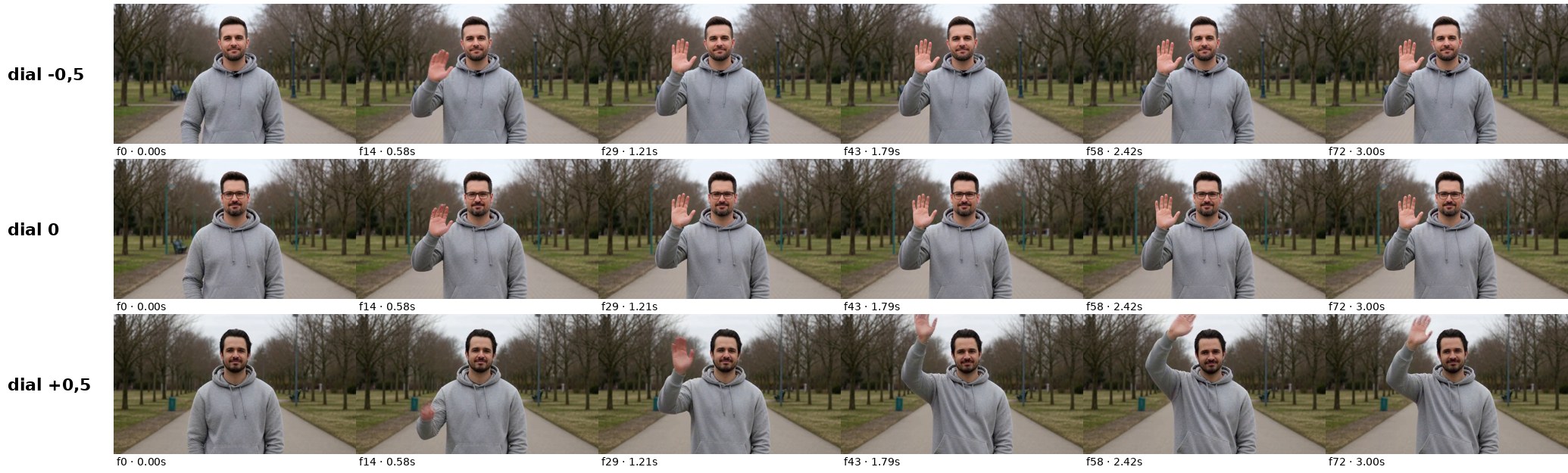
Six frames per clip, from 0 to 3 s. Rows: dial −0.5, 0 and +0.5. Same prompt, seed and settings; only the dial strength changes.
- Camera: locked off in all three clips, as prompted.
- Action: all three men raise a hand and wave. At +0.5 the arm goes above the head and the wave is visibly more energetic from about 1.8 s. At −0.5 the gesture stays at shoulder height, as it does at 0, perhaps slightly more restrained.
- A simple motion number: the mean absolute difference between consecutive frames (0-255 scale, no camera compensation) was 0.91 at −0.5, 1.32 at 0 and 2.16 at +0.5. It points the same way as the author’s measurements, but it is not the camera-removed optical flow they report, and it comes from one take.
- Identity: this is the finding to know before using a dial in production. At 0 the man wears glasses; at −0.5 he has no glasses and a different face; at +0.5 he is someone else, with different hair and beard. Background and framing stay put. The clips already differ in the first frame (mean pixel difference of about 11-13 against the dial-0 clip), so the dial changes the whole draw, not just the movement.
- Audio: each clip has a stereo AAC track that is almost silent (mean −51 to −54 dB), which fits the prompt. We measured the levels; we did not judge the sound by ear.
If you need the same character across dial values, fix the identity some other way, for example with a reference in r2v mode or an identity LoRA. We have not tested whether that keeps the person stable while the dial changes the motion.
Time and memory
| Clip | Total time | Note |
|---|---|---|
| −0.5 | 618 s | Includes loading the 32B text encoder from swap (about 4 min 48 s), loading the model and compiling |
| 0 | 142 s | Reused the cached prompt encoding and the loaded model |
| +0.5 | 47 s | Same |
These times are not comparable with each other: they mostly reflect what was already loaded. They do not show that a dial makes sampling faster or slower. VRAM peaked at about 24 GB in all three runs, because ComfyUI loads the model dynamically until the card is full; that figure is not the minimum the recipe needs.
What this test does not show
- A best strength. One seed and one take per value cannot establish one.
- The average size of the effect. The motion numbers come from three single clips.
- Behaviour with a fixed character. The identity change may be smaller or absent in r2v mode or with an identity LoRA; we have not tested it.
- Speed. See the caveat above.
The useful next round is the same three values on two or three more seeds, plus one run with a fixed character.
How to repeat it
- Install ComfyUI-Dials in
custom_nodes, copydials/h3_motion.safetensorstomodels/loras/dials/, and restart ComfyUI. - Load the package’s H3 example graph and confirm it renders at strength 0 before changing anything.
- Add your speed LoRA before Apply Dial if you use one, and keep model, prompt, seed, resolution, frame count and sampler identical across runs.
- Render −0.5, 0 and +0.5, save each graph, and compare frames from the start, middle and end of every clip, not just the first one.
- Check identity and audio separately from motion.
Next steps in ComfyUI
Getting started
More video and image AI workflows
- Wan 2.2 in ComfyUI: image-to-video Dual-model MoE architecture, VRAM requirements and real output.
- HunyuanVideo 1.5 in ComfyUI Real install of the I2V 480p step-distilled variant on an RTX 3090.
- 5 local AI video models tested on one RTX 3090 LTXV-2.3, SCAIL-2, Wan 2.1 and Wan 2.2, all benchmarked on the same hardware.
FAQ
- Does a dial replace an identity LoRA?
- No. In our test the dial changed the person as well as the motion. Use a LoRA or a reference for who appears, and the dial for how much they move, then check that the combination holds.
- Which package should I install?
- For a simple comparison like this one, the original ComfyUI-Dials is enough. Install ComfyUI-MAINodes if you want the Dial Rack, strength curves over time or the de-rope pass. Both read the same dial files.
- Is +0.5 a good default?
- It gave a clearly bigger gesture in our single take. Whether it is a good default for your shots needs more seeds and your own prompts.