
Setting up Krea 2 in ComfyUI isn’t straightforward—the official Comfy-Org template ships with a subgraph bug that breaks on load, the text encoder is Qwen3-VL (not CLIP), and quantization choices directly impact VRAM planning. This guide provides a tested, flat-workflow setup that produces high-quality 1024×1024 images in roughly 13 seconds per generation on an RTX 3090, without the template errors.
Krea 2 Turbo is a distilled image generation model built for speed without sacrificing quality. Unlike Stable Diffusion or FLUX, it uses a non-standard text encoder and VAE, works best with low CFG scales, and integrates natively into ComfyUI’s node system. Walk through this verified setup, and you’ll have a working Krea 2 workflow running smoothly.
At a Glance
| Aspect | Details |
|---|---|
| Model | Krea 2 Turbo (fp8_scaled variant) |
| Text Encoder | Qwen3-VL-4B (not CLIP) |
| VRAM Required | ~12.5 GB (RTX 3090 tested) |
| Generation Speed | ~13 seconds per 1024×1024 image at 8 steps |
| CFG Scale | 1.0 (critical—higher values degrade output) |
| Total Download | ~18.6 GB for all files |
| Setup Complexity | Medium (flat workflow, no subgraph) |
Why Krea 2 Turbo Matters for ComfyUI Users
Krea 2 Turbo is a distilled image generation model optimized for speed without sacrificing quality. It’s part of the Comfy-Org ecosystem and integrates directly into ComfyUI’s node system—but it behaves differently from Stable Diffusion or FLUX in ways that catch people off guard.
What makes it different:
- Uses Qwen3-VL-4B as its text encoder, not CLIP or T5
- Requires an unconventional VAE (qwen_image_vae, not the standard VAE)
- Works best with low CFG scales (around 1.0) due to its distilled nature
- Generates full-resolution 1024×1024 images in 8 steps on consumer hardware
This is the first mainstream turbo model in ComfyUI with native node support, which means you’re not working around missing features—you’re working with them as designed.
👉 Quick takeaway: Krea 2 is fundamentally different from standard diffusion models; it uses Qwen3-VL encoding and requires CFG=1.0 for best results, not the typical 7–15 range.
Hardware Requirements and VRAM Planning
Krea 2 Turbo comes in multiple quantization variants in the same HuggingFace repository. This guide only tested fp8_scaled, so treat the sizes below as what’s confirmed and the rest as “exists, check the repo for current numbers before downloading”:
| Variant | Confirmed | Notes |
|---|---|---|
| fp8_scaled | ✅ Tested here | 13.14 GB on disk, staged at ~12.5GB VRAM in the console log. This is what the rest of this guide uses. |
| bf16 | Not tested | Full precision, larger than fp8_scaled — for high-end cards only. |
| int8_convrot | Not tested | More aggressive quantization than fp8_scaled, aimed at smaller cards. |
| mxfp8 | Not tested | Mixed-precision quantization, another lower-VRAM option. |
| nvfp4 | Not tested | The most aggressive quantization in the repo, smallest file, likely the most quality loss. |
For this guide, fp8_scaled on an RTX 3090 (24GB) was the baseline. It loads cleanly, stages at approximately 12,530 MB in the console log, and leaves comfortable headroom for batch operations. If you’re on a smaller card, the untested variants above are worth trying first — check the Comfy-Org/Krea-2 HuggingFace repository for their current file sizes before downloading, since quantization repos get updated.
👉 Quick takeaway: fp8_scaled on a 24GB card is the tested, verified path in this guide. The other variants exist for smaller cards but weren’t benchmarked here — don’t trust invented VRAM numbers, check the repo directly.
ComfyUI Version and Dependency Setup
This setup was tested on ComfyUI v0.27.0 after upgrading from v0.17.2. The update process revealed a common Git issue worth documenting:
cd ComfyUI
git fetch origin
git checkout -f v0.27.0
The -f flag was necessary because ~735 files showed permission-only diffs with zero actual content changes. This is a recurring pattern in ComfyUI updates and is safe to force if you verify the diff first:
git diff HEAD origin/v0.27.0 | head -20If the output shows only old mode 100644 / new mode 100755 lines, permission changes are safe to force.
After checkout, reinstall dependencies:
venv/bin/python3 -m pip install -r requirements.txt --upgradeMinor warnings about numba and compressed-tensors appeared but didn’t block installation. These are non-critical.
⚠️ Important: If your venv’s pip binary has a stale shebang (common after moving or renaming the ComfyUI folder), always invoke pip via python3 -m pip, never call the pip binary directly. Direct calls will fail with path errors.
👉 Quick takeaway: Use git checkout -f for permission-only diffs, and always call pip via python3 -m pip to avoid shebang errors.
Model Files: What to Download and Where
Download these four files from the Comfy-Org/Krea-2 HuggingFace repository:
-
krea2_turbo_fp8_scaled.safetensors (13.14 GB)
- Location:
models/diffusion_models/ - The main diffusion model
- Location:
-
qwen3vl_4b_fp8_scaled.safetensors (5.24 GB)
- Location:
models/text_encoders/ - Text encoder (Qwen3-VL-4B, not CLIP). If ComfyUI reports this exact filename as missing, it’s the text encoder, not a checkpoint or LoRA — it belongs in
models/text_encoders/, notmodels/diffusion_models/.
- Location:
-
qwen_image_vae.safetensors (254 MB)
- Location:
models/vae/ - Custom VAE required for Krea 2
- Location:
-
krea2_darkbrush.safetensors (469 MB, optional)
- Location:
models/loras/ - Style LoRA for ink-doodle aesthetic
- Location:
Total download: ~18.6 GB. Verify the exact filenames match—ComfyUI’s node loaders are strict about naming.
Eight more style LoRAs exist in the same repository if you want to experiment (catalog verified 2026-07-07 — Comfy-Org rotates it occasionally, so check the repo directly if any of these 404): krea2_dotmatrix.safetensors, krea2_kidsdrawing.safetensors, krea2_neondrip.safetensors, krea2_rainywindow.safetensors, krea2_retroanime.safetensors, krea2_softwatercolor.safetensors, krea2_sunsetblur.safetensors, and krea2_vintagetarot.safetensors. They follow the same naming pattern and load via LoraLoaderModelOnly.
We tested all 9 (darkbrush included) on the same image and found most need their exact trigger phrase to activate — without it, they barely show. See the full comparison with real generated images and exact phrases in The 9 Krea 2 Style LoRAs: A Real Side-by-Side Comparison.
⚠️ Looking for
krea2_warmpastel.safetensors? It was listed in an earlier version of this guide, but Comfy-Org has since removed it from the Comfy-Org/Krea-2 repository — confirmed gone (404) as of 2026-07-07. If ComfyUI is throwing a “model not found” error forkrea2_warmpastel.safetensors, the file is gone, not misplaced. The 9 Krea 2 Style LoRAs comparison covers what’s actually in the catalog today.
The Working Flat Workflow (Official Template Bug Workaround)
ComfyUI v0.27.0 ships with a built-in Krea 2 template (image_krea2_turbo_t2i.json), but it uses a nested subgraph that fails to load with the error “Could not load subgraphs.” This is a mismatch between the frontend package (1.45.20) and the template’s subgraph format—not a missing-model problem.
The solution: build a flat, nine-node Krea 2 workflow by hand. It’s actually clearer for learning and works perfectly.
The Node Chain
| Node # | Node Type | Key Settings | Input From | Output To |
|---|---|---|---|---|
| 1 | UNETLoader | Model: krea2_turbo_fp8_scaled.safetensors; Weight dtype: default | — | KSampler or LoRA |
| 2 | CLIPLoader | Clip: qwen3vl_4b_fp8_scaled.safetensors; Type: krea2 | — | Both CLIPTextEncode nodes |
| 3 | CLIPTextEncode (Positive) | Positive prompt text | CLIPLoader | KSampler |
| 4 | CLIPTextEncode (Negative) | Empty or minimal negative | CLIPLoader | KSampler |
| 5 | VAELoader | Vae: qwen_image_vae.safetensors | — | VAEDecode |
| 6 | LoraLoaderModelOnly (optional) | Lora: krea2_darkbrush.safetensors; Strength: 0.8 | UNETLoader | KSampler |
| 7 | EmptyLatentImage | Width: 1024; Height: 1024; Batch: 1 | — | KSampler |
| 8 | KSampler | Steps: 8; CFG: 1.0; Sampler: euler; Scheduler: simple; Denoise: 1.0 | Model, Conditioning, Latent | VAEDecode |
| 9 | VAEDecode | — | KSampler, VAELoader | SaveImage |
| 10 | SaveImage | Filename prefix: krea2_output | VAEDecode | — |
Critical settings:
- CLIPLoader type must be
krea2, not “clip” or “stable_diffusion” - CFG must be 1.0—Krea 2 Turbo is a distilled model tuned for minimal guidance
- Sampler:
euler; Scheduler:simplefor consistent, fast convergence - Steps:
8is the baseline; 6–10 steps all work, but 8 is the sweet spot
This is a genuinely simple, fast workflow. No exotic nodes, no custom scripts—just standard ComfyUI primitives wired together correctly.
🏗️ Workflow: Krea 2 Turbo (flat graph, no subgraph bug)
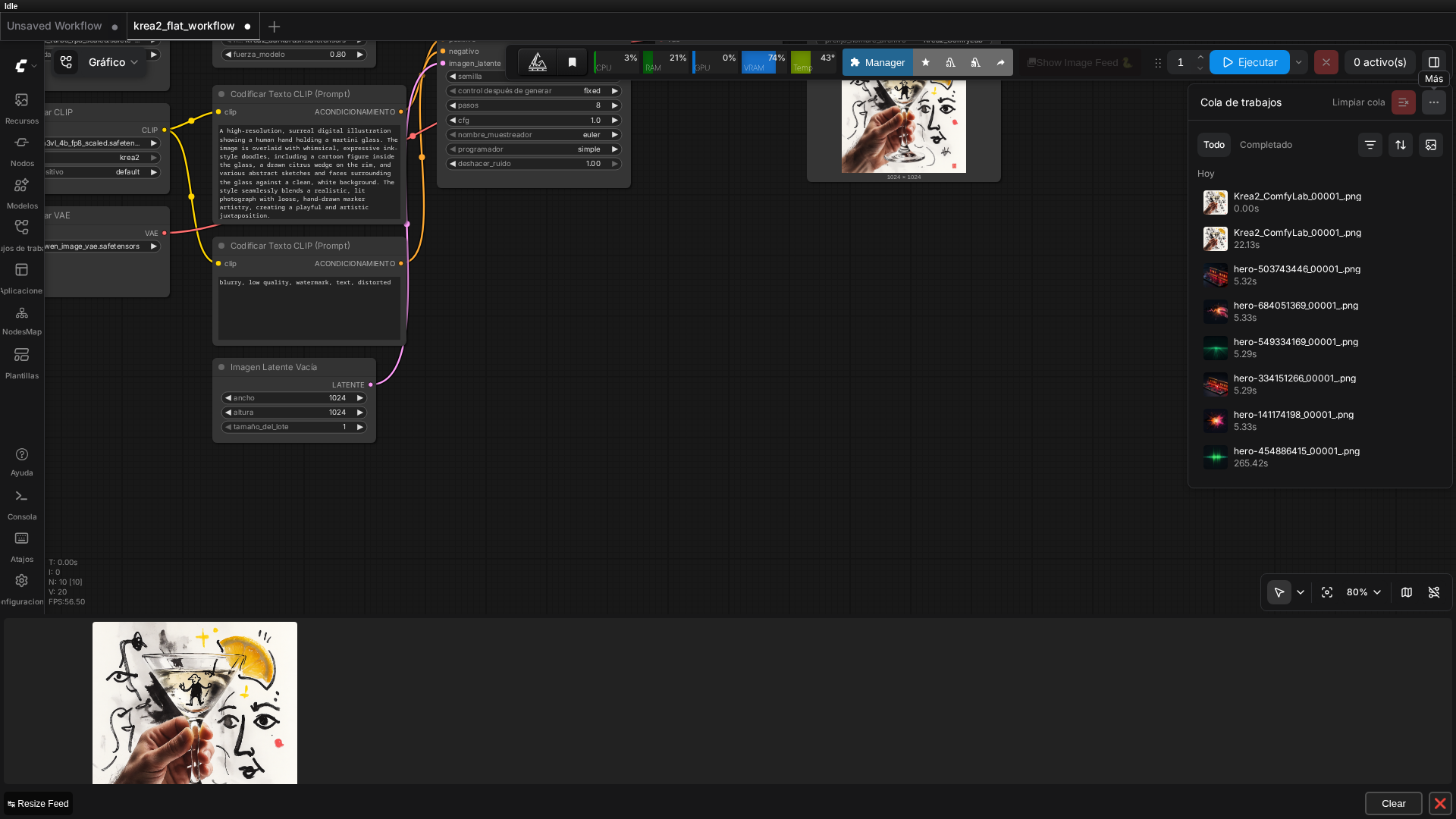 Real screenshot of the flat 9-node graph running in ComfyUI v0.27.0, with the result already generated.
👉 Quick takeaway: The flat workflow avoids the subgraph bug entirely; the critical settings are CLIPLoader type=“krea2” and CFG=1.0.
Real Generation Performance
Measured on RTX 3090 with fp8 quantization:
- Steady-state generation time: ~13 seconds per image (8 steps)
- First generation after model load: a few extra seconds for “Model Initializing” overhead
Queue screenshots from testing show 19.99s and 20.91s wall-clock times for two back-to-back generations, which includes UI queue overhead and screenshot capture latency. The pure model execution clocks in at the lower ~13-second figure. No crashes or VRAM errors occurred across the handful of generations run for this test, but this wasn’t a stress test of dozens of consecutive runs.
📌 Keep in mind: These numbers assume the model is already loaded in VRAM. First-time setup or after clearing cache will add overhead.
Test Prompt and Output Quality
The official template includes a test prompt that produces genuinely strong results—a blend of realistic photography and expressive ink-style illustration:
“A high-resolution, surreal digital illustration showing a human hand holding a martini glass. The image is overlaid with whimsical, expressive ink-style doodles, including a cartoon figure inside the glass, a drawn citrus wedge on the rim, and various abstract sketches and faces surrounding the glass against a clean, white background. The style seamlessly blends a realistic, lit photograph with loose, hand-drawn marker artistry, creating a playful and artistic juxtaposition.”
 Real output from the workflow (1024x1024, 8 steps, no darkbrush LoRA), generated in this session on an RTX 3090.
With the darkbrush LoRA at 0.8 strength, this prompt produces a clean, detailed output that genuinely looks hand-illustrated. The model respects compositional instructions and text elements with reasonable accuracy.
Try this prompt first before experimenting with your own. It’s a solid baseline for validating the Krea 2 Turbo setup.
Native Krea 2 Nodes (Alternative Path)
ComfyUI v0.27.0 includes three dedicated Krea 2 nodes in the core node set:
ModelMergeKrea2Krea2ImageNodeKrea2StyleReferenceNode
These exist and are discoverable via the /object_info API endpoint. However, they weren’t tested in this session. The flat workflow above is the verified, working approach and arguably more transparent for learning. If you prefer a more integrated, abstracted interface, these native nodes are worth exploring—just expect to debug any issues against the flat workflow as a reference.
Troubleshooting Common Issues
| Issue | Solution |
|---|---|
| ”Could not load subgraphs” error | Use the flat workflow above instead. Don’t re-download models or reinstall ComfyUI. |
| Model files not found by CLIPLoader | Verify exact filenames match (case-sensitive on Linux/macOS). Restart ComfyUI after placing files. |
| CFG scale producing weird results | Krea 2 Turbo is distilled for CFG ≈ 1.0. Higher values (7, 15) degrade output. Trust the low CFG. |
| Pip install fails with “broken shebang” error | Always use venv/bin/python3 -m pip, never venv/bin/pip directly. |
| VRAM overflow on smaller cards | Download krea2_turbo_nvfp4.safetensors instead of fp8_scaled — it’s the most aggressive quantization in the repo, not benchmarked in this guide but the obvious first thing to try. |
krea2_warmpastel.safetensors not found (404) | Removed from the Comfy-Org/Krea-2 repo (confirmed gone as of 2026-07-07). It’s gone, not renamed — see the style LoRA comparison for what’s available now. |
FAQ
Q: Why does the official Krea 2 template show ‘Could not load subgraphs’ in ComfyUI?
A: The official Comfy-Org template uses a nested subgraph node that appears incompatible with the current comfyui-frontend-package version. Every model file can be correctly installed and you’ll still hit this error. The fix is to build an equivalent flat workflow with the same 9 nodes instead of using the subgraph-based template.
Q: How much VRAM does Krea 2 need in ComfyUI?
A: The fp8_scaled variant used here staged at 12.5GB VRAM once loaded, well within a 24GB card with headroom to spare. The same HuggingFace repo also offers bf16, int8_convrot, mxfp8, and nvfp4 quantized variants for lower-VRAM cards.
Q: What text encoder does Krea 2 use?
A: Krea 2 uses Qwen3-VL-4B (qwen3vl_4b_fp8_scaled.safetensors), not a CLIP or T5 text encoder. Load it with the core CLIPLoader node set to type=“krea2”.
Q: Where can I find krea2_warmpastel.safetensors?
A: It’s gone from the Comfy-Org/Krea-2 HuggingFace repository — confirmed missing (404) as of 2026-07-07, though the exact removal date isn’t documented. It appeared in an earlier version of this guide before the removal. See our comparison of the 9 Krea 2 style LoRAs currently available for working alternatives.
Q: How fast is Krea 2 Turbo generation?
A: About 13 seconds per 1024x1024 image at 8 steps on an RTX 3090 with fp8, once the model is already loaded in VRAM. The very first generation after loading takes a few extra seconds of model initialization overhead.
Keep Reading
If quantization formats are new to you, our guide to GGUF models in ComfyUI explains what quantization actually does to model quality and VRAM. For picking hardware that handles workflows like this comfortably, see our Best GPU for ComfyUI buyer’s guide. And if you hit node-loading errors on other workflows, our custom node troubleshooting guide covers the general “Import Failed” / broken-node patterns beyond this specific subgraph bug.
🏆 Our Recommendation
If you have an RTX 3090 or 4090 (24GB+): Use the fp8_scaled variant with the flat workflow above. It’s the tested baseline in this guide and comfortably fits with headroom to spare.
If you’re on a smaller card: The same HuggingFace repo has bf16, int8_convrot, mxfp8, and nvfp4 variants aimed at lower VRAM — none of them were benchmarked in this guide, so check the repo for current file sizes and test quality yourself before committing to a workflow.
If you’re new to ComfyUI: Start with the flat workflow in this guide, not the official template. It’s clearer, avoids the subgraph bug, and teaches you how the nodes actually work together.
Next steps in ComfyUI
Getting started
FAQ
- Why does the official Krea 2 template show 'Could not load subgraphs' in ComfyUI?
- The official Comfy-Org template uses a nested subgraph node that appears incompatible with the current comfyui-frontend-package version. Every model file can be correctly installed and you'll still hit this error. The fix is to build an equivalent flat workflow with the same 9 nodes instead of using the subgraph-based template.
- How much VRAM does Krea 2 need in ComfyUI?
- The fp8_scaled variant used here staged at 12.5GB VRAM once loaded, well within a 24GB card with headroom to spare. The same HuggingFace repo also offers bf16, int8_convrot, mxfp8, and nvfp4 quantized variants for lower-VRAM cards.
- What text encoder does Krea 2 use?
- Krea 2 uses Qwen3-VL-4B (qwen3vl_4b_fp8_scaled.safetensors), not a CLIP or T5 text encoder. Load it with the core CLIPLoader node set to type="krea2".
- Where can I find krea2_warmpastel.safetensors?
- It's gone from the Comfy-Org/Krea-2 HuggingFace repository -- confirmed missing (404) as of 2026-07-07, though the exact removal date isn't documented. It appeared in an earlier version of this guide before the removal. See our comparison of the 9 Krea 2 style LoRAs currently available for working alternatives.
- How fast is Krea 2 Turbo generation?
- About 13 seconds per 1024x1024 image at 8 steps on an RTX 3090 with fp8, once the model is already loaded in VRAM. The very first generation after loading takes a few extra seconds of model initialization overhead.