“Use the GGUF version, it’s smaller and faster” is the advice you’ll find in any ComfyUI thread about large models. It’s partly true — but we decided to check what actually happens to VRAM, not just file size, by generating the same image twice: once with the full bf16 checkpoint of Z-Image Turbo, once with its GGUF Q8_0 quantization. Same prompt, same seed, same RTX 3090.
⚠️ Transparency note: our first VRAM measurement had a methodology flaw — we monitored
nvidia-smifor only the first ~2 minutes of each generation and missed the tail end, which is actually where the real peak is. After fixing it and measuring the full generation start to finish (with the GPU idle at the start of each test), the result changed. We’re leaving this note instead of quietly erasing the trail, because catching our own mistake is arguably the most useful lesson in this article.
At a glance: bf16 vs GGUF Q8_0
| Aspect | bf16 (full) | GGUF Q8_0 |
|---|---|---|
| Disk size | 12.3 GB | 6.2 GB |
| Cold load (1st run) | 233s | 70s |
| Warm load (2nd run) | 104s | 50s |
| Peak VRAM (full measurement) | 21.3 GB | 17.4 GB |
| Visual quality | Baseline | Practically identical |
Why we tested this instead of assuming it
GGUF quantization has become the default answer for running large models on consumer GPUs: fewer bits per parameter, smaller file, fits where it didn’t before. What rarely gets verified is whether “smaller file” automatically translates into “less VRAM during generation, and by the same proportion” — these are related but not identical, because what fills VRAM isn’t the file on disk but the tensors the model builds in memory during compute.
We picked Z-Image Turbo for this test because we already had both formats (bf16 and GGUF Q8_0) downloaded locally from ComfyLab’s hero-image pipeline, so no new downloads were needed for an honest comparison.
⚠️ Editorial precision note: the usual headline is “fp8 vs GGUF,” but we couldn’t find any real fp8_scaled checkpoint of Z-Image Turbo published (only bf16, int8_convrot and nvfp4 in the official Comfy-Org repo) that we could download without running out of disk space at the time of testing. We’re comparing bf16 (full precision) against GGUF Q8_0, which is the real, verifiable comparison we could actually run — we’re not going to title it “fp8” just because that’s the more common search term.
The test: same prompt, same seed, same GPU
We generated the same scene with both formats:
- Prompt: “cinematic photograph of a vintage mechanical typewriter on a wooden desk near a rain-streaked window, warm afternoon light, dust particles visible in the light beam, shallow depth of field, sharp focus on typewriter keys, 35mm photography, high detail, film grain”
- Seed:
555111333(fixed across all runs) - Resolution: 1024×1024
- Sampler:
res_multistep/simple, 8 steps, cfg 1 - Text encoder:
qwen_3_4b.safetensors(identical in both cases, only the diffusion model changes)
The only change between runs was the model-loading node: UNETLoader pointing to z_image_turbo_bf16.safetensors in one case, UnetLoaderGGUF pointing to Z-IMAGE/z_image_turbo-Q8_0.gguf in the other.
For speed, each format ran twice: once “cold” (file not yet in disk cache) and once “warm” immediately after. For VRAM, we re-measured each format separately starting from a fully idle GPU (explicitly freed via ComfyUI’s /free endpoint before each test), with nvidia-smi sampling every second through the entire generation, not just the start.
Result 1: speed — GGUF won clearly
| bf16 | GGUF Q8_0 | |
|---|---|---|
| Cold load | 233s | 70s |
| Warm load | 104s | 50s |
GGUF was faster in both cases, cold and warm. That makes sense: fewer bytes to read from disk (6.2GB vs 12.3GB), and ComfyUI-GGUF’s loading path for this model appears efficient even with the dequantization overhead.
👉 What this confirms: if your bottleneck is load time or disk reads, GGUF genuinely helps.
Result 2: VRAM — GGUF wins, but by far less than the disk size suggests
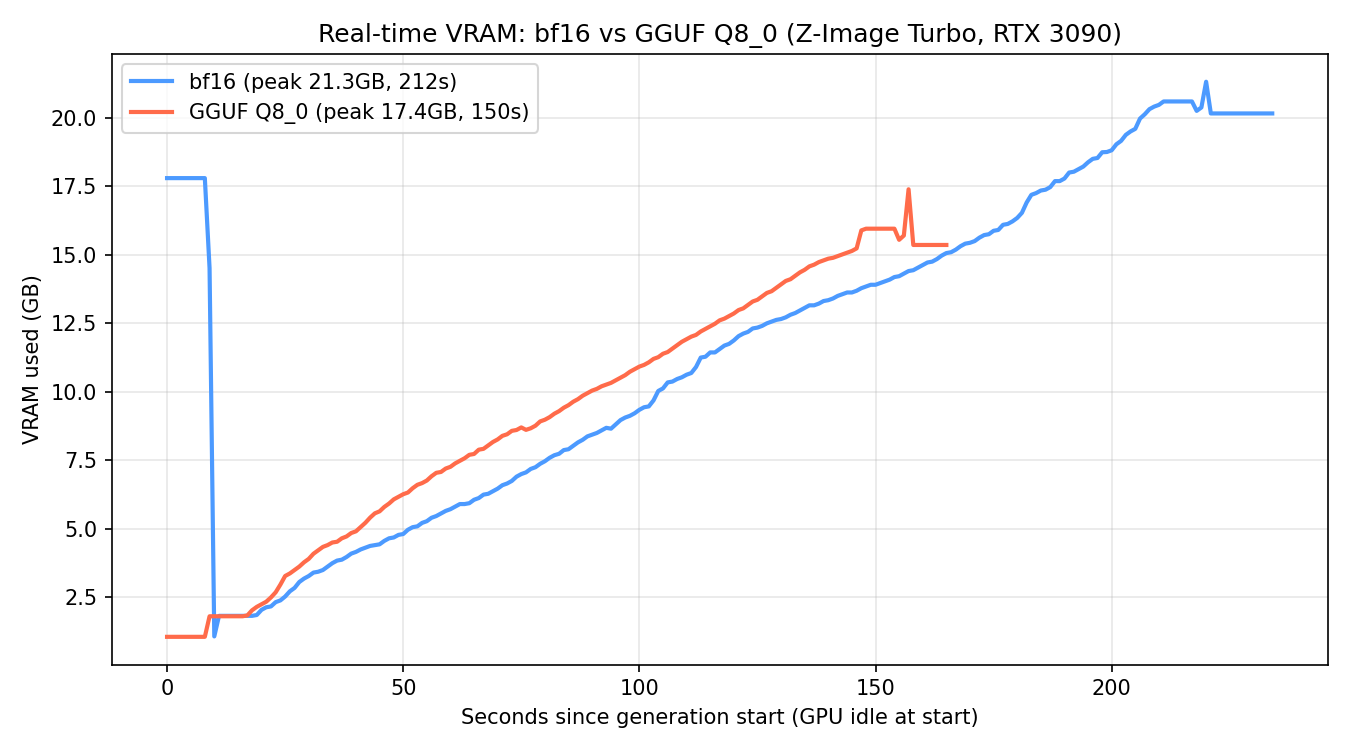 Real
Real nvidia-smi trace sampled every second, both tests starting from an idle GPU. The peak isn’t at model load — it’s at the end, coinciding with VAE decode.
| bf16 | GGUF Q8_0 | |
|---|---|---|
| Peak VRAM | 21.3 GB | 17.4 GB |
GGUF Q8_0 did use less peak VRAM than bf16 — a 3.9GB difference, roughly 18% less. But compare that to the disk saving: the GGUF file is 50% smaller. The VRAM saving isn’t remotely proportional to the disk saving.
Why: ComfyUI-GGUF doesn’t run compute directly on the quantized weights — it dequantizes them to a higher precision during the forward pass. That process creates in-memory tensors that take up more room than the quantized file on disk, so part of GGUF’s theoretical saving gets eaten up during generation. There’s still a net saving (17.4GB is less than 21.3GB), but a much more modest one than a file half the size might suggest.
The other thing that jumps out of the chart: the VRAM peak in both formats lands near the end of generation, not at model load. This coincides with VAE decoding of the final latent into an image — a step that isn’t quantized in either case and adds a substantial amount of VRAM on top of whatever the model is already using. If you’re sizing how much VRAM a workflow needs, don’t just measure the load moment: the real peak can be at the end.
⚠️ Important: if your goal is squeezing the most out of a low-VRAM GPU, don’t assume GGUF’s disk saving translates 1:1 into VRAM. In our test, switching from bf16 to GGUF Q8_0 freed 3.9GB, not the ~6GB the file size might suggest. Measure with
nvidia-smiacross the full generation, not just at model load.
Result 3: visual quality — practically identical
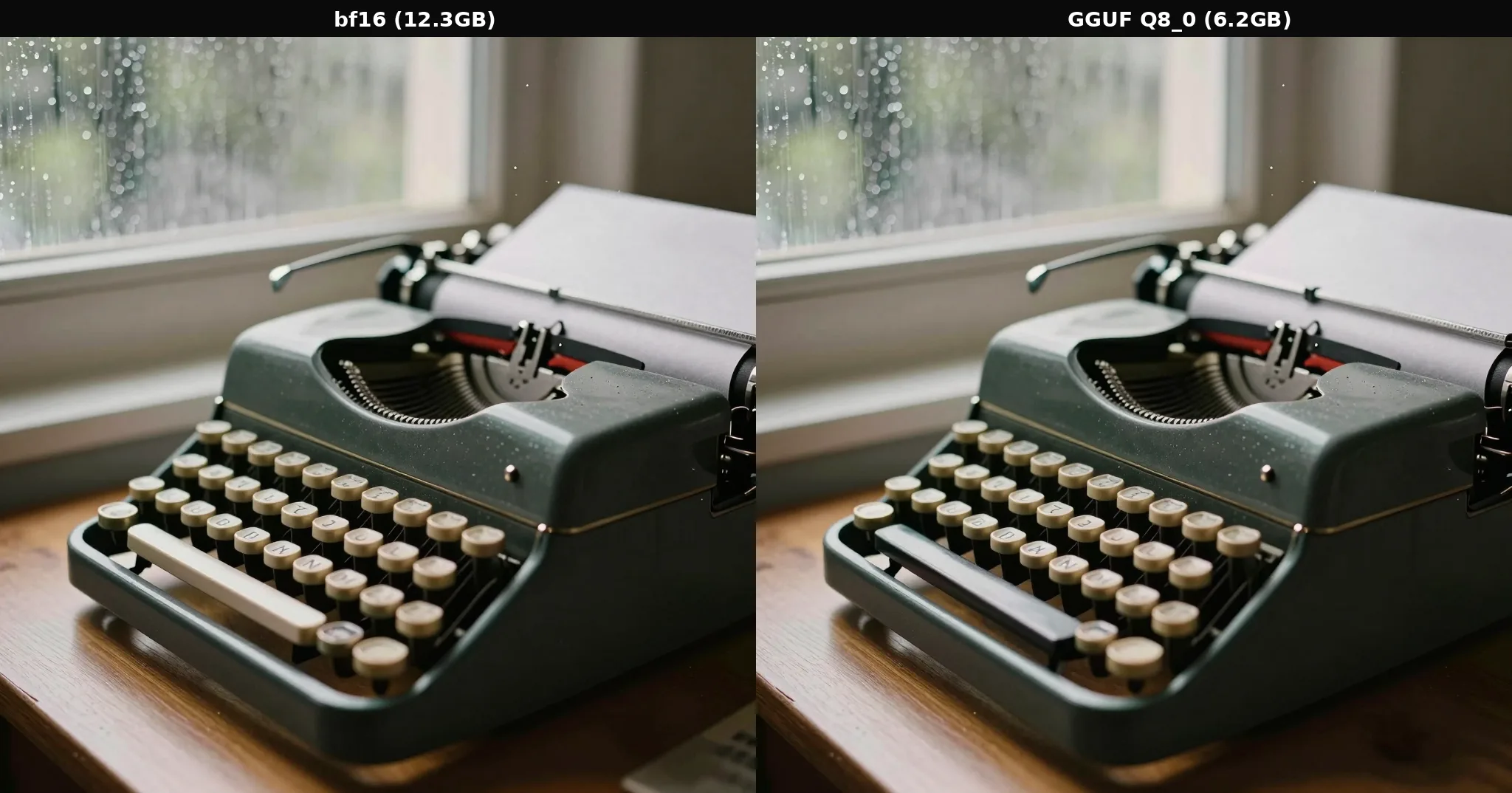 Same prompt, same seed. Differences only appear in fine details like the illegible text on the keys or the exact position of dust particles — attributable to the numerical rounding of quantization, not real quality loss.
With Q8_0 (the most conservative GGUF quantization, 8-bit), we found no perceptible quality loss: composition, lighting, depth of field and subject sharpness were equivalent in both images. The only visible differences are in minor details that are already inherently random in any generation (illegible key text, dust in the air).
👉 What we learned: at Q8_0, GGUF quantization doesn’t cost visible quality. We haven’t tested more aggressive levels (Q4, Q5) on this same model — it’s reasonable to expect visible degradation there, but that’s a follow-up test.
How to replicate this in your own workflow
The change between formats is minimal at the graph level:
- Replace the
UNETLoadernode withUnetLoaderGGUF(or vice versa). - Point
unet_nameto the.gguffile instead of the.safetensorsone. - Everything else — CLIPLoader, VAELoader, KSampler, seed — stays exactly the same.
If your priority is disk space, GGUF clearly wins (50% smaller). If your priority is VRAM, GGUF also wins, but measure how much you actually need with your own model — in our test the saving was only 18%, not proportional to the file size. And in both cases, size your VRAM budget around the peak at the end of generation (VAE decode), not just the model-load moment.
Limitations of this test
- We only compared bf16 vs GGUF Q8_0 for a single model (Z-Image Turbo). There’s no real fp8_scaled in the comparison, due to the lack of a public downloadable checkpoint that fit our available disk space.
- We didn’t test more aggressive GGUF quantization levels (Q4_K_M, Q5_K_M, Q6_K) on this same model — the VRAM pattern and the saving margin could change at heavier quantization.
- This is a single ~6B-parameter image model; VRAM behavior on much larger video models (like LTX 2.3 22B, where we do have several GGUF levels downloaded) remains a follow-up comparison.
- Single run per format for the final VRAM measurement (n=1) — we didn’t average multiple runs.
Frequently asked questions
Does GGUF always use less VRAM than bf16 in ComfyUI?
In our test with Z-Image Turbo on an RTX 3090, yes — GGUF Q8_0 hit a lower peak VRAM (17.4GB) than the full bf16 checkpoint (21.3GB). But the real saving (18%) was much smaller than the disk saving (50%), so don’t assume a file half the size will free up half the VRAM.
Why does the VRAM peak land at the end of generation instead of during model load?
Because it coincides with VAE decoding of the final latent into an image, a step that uses a fair amount of memory regardless of the diffusion model’s format. The model stays resident in VRAM during that step, so the total peak is roughly the model’s memory footprint plus the cost of that decode.
So what’s GGUF actually better for, disk or VRAM?
Mostly disk: half the size with equivalent quality at Q8_0. The VRAM saving is real but much more modest (18% in our test) because ComfyUI-GGUF dequantizes weights on-the-fly during compute.
Did I lose visual quality using GGUF Q8_0 instead of bf16?
In our comparison with the same prompt and seed, the difference was practically imperceptible. Q8_0 is the most conservative 8-bit GGUF quantization — more aggressive levels would likely show more difference.
Why did the first generation take so much longer than the second?
Operating system disk cache. The first load has to read the full file from disk; subsequent generations benefit from Linux already having the file in page cache.
Keep reading
If you want to see GGUF quantization applied to a much larger video model, our LTX Director test on LTXV-2.3 and the camera movement transfer with IC-LoRA use GGUF Q6_K variants of the 22B-parameter dev model. And if you’re curious how Z-Image Turbo behaves in normal generation, the same bf16 checkpoint powers ComfyLab’s hero-image pipeline. On the video side, we ran the same kind of speed-vs-VRAM test on MiniMax H3 with Sage Attention and Sol-Attn on this same RTX 3090.
Conclusion: measure the full generation, not just the load
🏆 Our recommendation
If your limit is disk space → GGUF clearly wins, half the size with equivalent quality at Q8_0. If your limit is VRAM → GGUF also wins, but by a much smaller margin (18%, not 50%) than the file size suggests — measure with your own model before taking the saving for granted. If your limit is load time → GGUF was faster in both scenarios (cold and warm) in this test.
The underlying lesson, including our own stumble measuring this the first time: when you measure VRAM, monitor the full generation, not just the load moment. The peak can land anywhere in the process — here, at the end, during VAE decode — and cutting the measurement short can hand you a conclusion that’s flatly wrong.
Next steps in ComfyUI
Getting started
FAQ
- Does GGUF always use less VRAM than bf16 in ComfyUI?
- In our test with Z-Image Turbo on an RTX 3090, yes -- GGUF Q8_0 hit a lower peak VRAM (17.4GB) than the full bf16 checkpoint (21.3GB). But the real saving (18%) was much smaller than the disk saving (50%), so don't assume a file half the size will free up half the VRAM. Our first measurement of this actually got it backwards -- we only monitored VRAM for the first ~2 minutes of each run and missed the real peak, which lands at the end of generation during VAE decode. Fixed after measuring the full run start to finish.
- Why does the VRAM peak land at the end of generation instead of during model load?
- Because it coincides with VAE decoding of the final latent into an image, a step that uses a fair amount of memory regardless of the diffusion model's format (the VAE isn't quantized in either case). The model -- whether bf16 or dequantized from GGUF -- stays resident in VRAM during that step, so the total peak is roughly the model's memory footprint plus the cost of that decode.
- So what's GGUF actually better for, disk or VRAM?
- Mostly disk: half the size with equivalent quality at Q8_0. The VRAM saving is real but much more modest (18% in our test) because ComfyUI-GGUF dequantizes weights on-the-fly during compute -- that process creates tensors that take up more room than the quantized file on disk, eating into the theoretical saving.
- Did I lose visual quality using GGUF Q8_0 instead of bf16?
- In our comparison with the same prompt and seed, the difference was practically imperceptible -- equivalent composition, lighting and detail, with only minor variations in fine details (illegible text on typewriter keys, exact dust particle positions) attributable to the numerical rounding of quantization, not real quality loss. Q8_0 is the most conservative 8-bit GGUF quantization -- more aggressive levels (Q4, Q5) would likely show more difference.
- Why did the first generation take so much longer than the second?
- Operating system disk cache. The first load of each checkpoint (233s for our bf16) has to read the full file from disk for the first time; subsequent generations with the same model (104s) benefit from Linux already having the file in page cache. If you're comparing load times between formats, always measure the second run ('warm'), not the first -- otherwise you're measuring disk speed, not the format itself.