Two YouTube videos went up the same day, September 3rd (both under 400 views when we checked), proposing speed tricks for MiniMax H3 in ComfyUI: a step-distilled acceleration LoRA, a combination of Sage Attention with a new “Sol-Attn” from Kijai, and a two-stage latent upscale. We didn’t repeat the video’s numbers — we tested them on our own RTX 3090, same prompt and seed in every comparison, to isolate only the variable that changed. The first two tricks (Sage Attention and Sol-Attn) work exactly as advertised. The third hid a real bug neither original video mentions — and, as you’ll see below, we didn’t fully solve it on the first try either.
At a glance
| Aspect | Details |
|---|---|
| Base model | MiniMax H3 INT8 ConvRot (minimax_h3_fl2va_pruned_int8_convrot.safetensors) |
| Acceleration LoRA | Official 4-step turbo (lightx2v/Comfy-Org), the same one LoRA in all three comparisons |
| Test GPU | RTX 3090 24GB (Ampere, sm_86) — a single GPU, not generalizable to other models |
| Constant prompt and seed | Same across comparisons 1-3, to isolate the attention backend |
| Base resolution | 736x416 (0.3 MP), 294 frames (12.25s at 24fps) |
| Best speed combo | Sage Attention + Sol-Attn: 129.1s → 78.0s (-40%) |
| Bug found | Latent upscale duplicates the scene’s subject; larger tiles reduce it but don’t eliminate it |
Fixing what the auto-captions mangled
Both original videos have YouTube’s English auto-captions, and several technical proper nouns came out unrecognizable. “Soul attention” isn’t a funny transcription slip — it’s Sol-Attn, a real sparse-attention method from Kijai based on the Sol-Attn paper (arXiv:2607.24027), published as ComfyUI-SolAttn_triton. And “comfy kitchen attention” from the second video wasn’t an error either — it’s a real package (comfy-kitchen, already installed in our own ComfyUI 0.34.2 as a core dependency).
The acceleration LoRA described in the first video (a 4-step version and an 8-step one, released two weeks apart) lines up better by release date with the official lightx2v/Comfy-Org turbo LoRA, documented directly in ComfyUI’s own native MiniMax H3 template — not with the “PDD Acc LoRA” alternative from Alibaba PAI we initially considered. We couldn’t confirm that 100% without seeing the video’s screen, so we used the official turbo LoRA we already had downloaded.
Method: same prompt, same seed, shared cache
To keep the attention comparison clean, we used the same prompt, the same seed (777), and the same clip length (294 frames, 12.25s) across the first three tests:
Tracking shot of a red fox sprinting through a snowy pine forest at dawn, powder snow
kicking up behind its paws, low morning mist between the trees, warm sun rays cutting
through fog, frost on branches, photorealistic wildlife cinematography, shallow depth
of field, natural sound of snow crunching and wind through pines.
Resolution 736×416, euler sampler, simple scheduler, 4 steps, turbo LoRA always on. ComfyUI’s logs confirm the base conditioning and noise were reused from cache across the three tests (execution_cached on nodes 1-8) — the timing delta measured is exclusively the attention backend’s cost, not conditioning-rebuild noise.
Tests 1-3: Sage Attention and Sol-Attn
| Test | Configuration | Time (server, warm cache) | Δ vs baseline |
|---|---|---|---|
| Baseline | 4-step LoRA, default attention (PyTorch) | 129.1 s | — |
| + Sage Attention | PathchSageAttentionKJ, auto mode | 94.4 s | -27% |
| + Sol-Attn (blocks 0-2 dense, rest sparse) | tau=1.3, int8_qk/int8_pv on | 78.0 s | -40% |
👉 What matters: Sol-Attn installed with a plain git clone into custom_nodes/ (nothing to compile by hand — Triton compiles its own kernel on first use) and ran without errors on our Ampere card, despite the project’s own README stating “tested on RTX 4090 and RTX 5090”. That’s not an empty compatibility claim — it’s an earlier-generation card where, in this specific configuration, it just worked.
Sage Attention + Sol-Attn combined: 78 seconds for 12.25 seconds of video, same seed as the rest of this article. No visible structural distortion.
The exact SolAttnPatch config we used:
tau: 1.3
start_percent: 0.0    end_percent: 1.0
dense_blocks: "0-2"    (the first 3 blocks stay on Sage Attention)
sink_conditioning: exact_kv_and_rows
int8_qk: true          int8_pv: true
morton: false           morton_curve: 2d_frame
use_tma: false
⚠️ A real snag from our test: our first SolAttnPatch attempt failed with an HTTP 400 because the node (ComfyUI’s V3 schema) explicitly requires 7 fields neither video shows on screen: int8_pv, verbose, morton, morton_curve, use_tma, dense_blocks, and sink_conditioning. If you build the graph by hand or via API instead of the GUI (which fills in the defaults for you), you have to declare all of them.
Test 4: two-stage latent upscale — and a real bug
The third trick generates a base video at low resolution to lock down motion fast, then upscales it in latent space with a dedicated model (minimax_h3_latent_upscaler_3d_bf16.safetensors, from LBH-123-AI) instead of regenerating everything at high resolution. We used the same prompt and seed as the rest of this article: base 736×416 → target 1344×768 (~3.3x pixel area).
The MMH3SpatialSplitParams node splits the frame into tiles to process separately, and we already knew from an earlier internal test (25/08, on an unrelated video project) that its fade_width/fade_height parameter ships with a default (32px) too low against the overlap (128px), producing a visible color seam between tiles. We fixed that by setting fade_width=fade_height=128 — confirmed today it’s still the node’s uncorrected default in the current version, not a one-off issue from an old install.
With the seam fixed, we first tried the default tile size (512×512), which over a 1344×768 target needs a 2×2 tile grid:
285.1 seconds of render for this: up to four different foxes visible at once, one per quadrant of the 2x2 grid. Same prompt, same seed as the rest of this article — this isn’t a prompt problem.
This is not the known seam bug. It’s something worse: each tile generated an almost independent scene — with its own fox — instead of a cropped slice of the same continuous scene. A color seam is something you can live with; a duplicated subject invalidates the whole clip.
First fix attempt, insufficient: we repeated the test with larger tiles — tile_width=896, tile_height=768 (the target’s full height, horizontal splitting only, 2×1 grid). Checking a single frame (frame 150 of 294) showed one fox, and we called the problem solved. That was a verification mistake. Systematically checking 9 frames spread across the clip, duplication was still there in several of them — just that in some the second fox is partially hidden behind a tree or out of focus, much less obvious than with small tiles, but real:
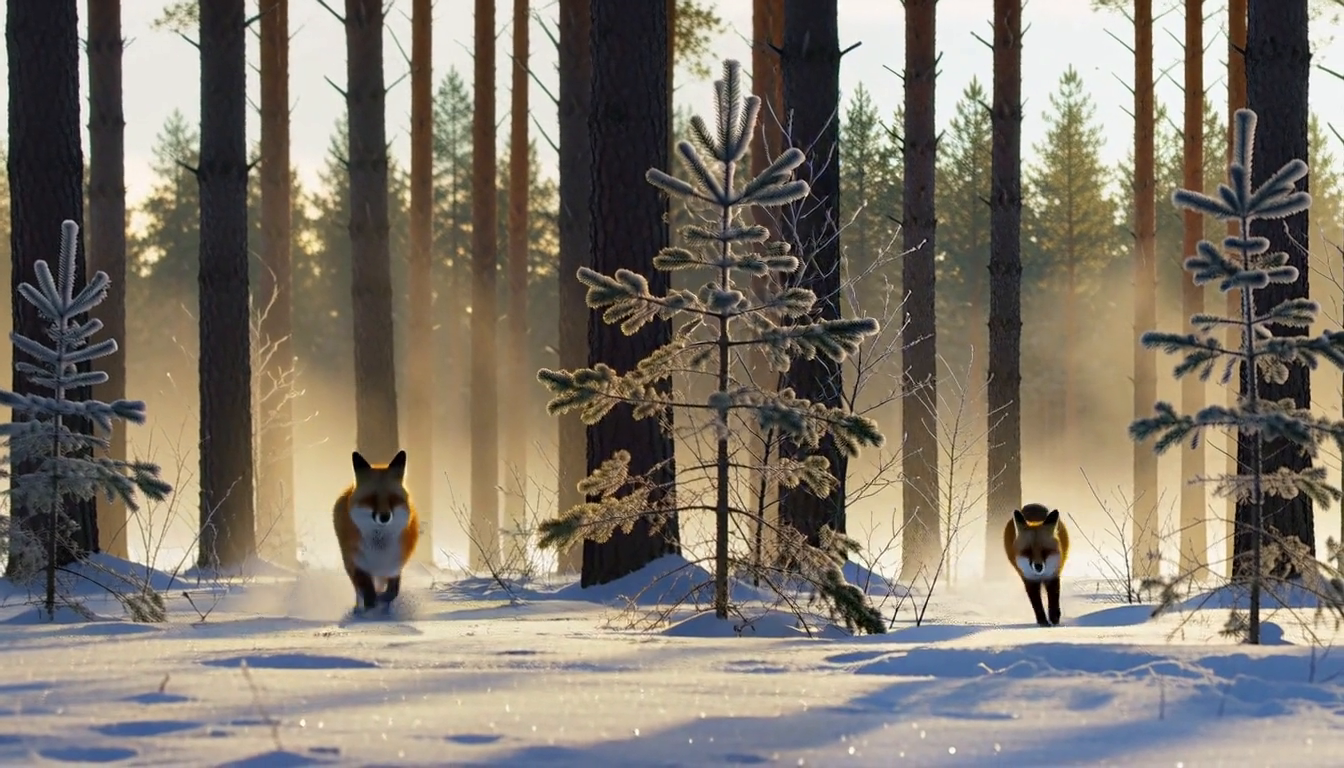
Frame 30 of 294 with 896x768 tiles: two foxes still visible, one on each side of the boundary between the two horizontal tiles. Less severe than with 512px tiles, but not fixed.
What actually worked, verified across 9 frames: removing tile splitting entirely — a single 1344×768 tile (the full target), no grid at all:
Same prompt, same seed, same 1344×768 target, no tiles. One fox across the 9 frames we checked, sharper frost detail — but 340.1 seconds, slower than both tiled configurations.
👉 The real practical rule, not the one we published at first: in this test, subject duplication doesn’t disappear once tiles are “big enough” — it becomes less frequent, but only actually stopped once we removed tile splitting completely. That flips the speed benefit on its head: the only reliable configuration we verified was also the slowest of the three (340.1s vs. 285.1s and 170.2s). If your scene has a single, salient subject moving through frame (like this fox), check several frames spread across the whole clip — not just one — before trusting any tile size. We haven’t swept the full tile-size space to find a middle ground that eliminates duplication without giving up all the speed benefit of tiling.
VRAM: the savings are in time, not memory
We only captured one VRAM snapshot (no per-test peak measurement): 23.4GB of 24.5GB with models resident, at a lower resolution than this article’s main tests. This matches what the original video already warned about the latent upscale trick: when it saves anything, it saves time, not memory — somewhere in the process the pipeline still works with the high-resolution latent.
Limitations of this test
- A single GPU (RTX 3090). We can’t generalize to Ada Lovelace/Blackwell or to cards with less VRAM.
- One prompt and one seed per comparison — no statistical repetition.
- We didn’t explicitly compare “generate directly at 1344×768 with no upscale” against the two-stage pipeline at the same step count — that data point is what you’d need to state exactly how much time the latent upscale saves (if any) versus going straight to the final resolution.
- We didn’t test the 8-step LoRA or the “PDD Acc LoRA” alternative from Alibaba PAI mentioned in the first video — only the 4-step turbo LoRA we already had downloaded.
- We didn’t sweep the tile-size space between 896px and “no splitting” — there may be a middle ground that eliminates duplication without losing all the speed benefit of tiling; we haven’t found it.
- Our first check of the 896x768 configuration relied on a single sample frame and wrongly concluded the problem was fixed — we corrected that by checking 9 frames spread across the clip before publishing. A reminder that a single frame is never enough evidence for a multi-second clip.
Conclusion
Sage Attention and the Sage+Sol-Attn combo from Kijai deliver what they promise on our own RTX 3090: -27% and -40% render time respectively, no visible quality cost in this test, and Sol-Attn works on Ampere despite its own README not listing it as tested. The two-stage latent upscale is more complicated than it first looked: subject duplication gets less frequent as you grow the tiles, but in our specific test it didn’t fully disappear until we removed tile splitting completely — and that configuration was the slowest of the three, not the fastest. There’s no free lunch here: it’s a real trade-off between speed and reliability that depends on how well your scene tolerates being split into tiles.
🏆 Our recommendation
Sage Attention is the lowest-risk win in this article — a single pip install, no visible behavior change, turn it on whenever you work with MiniMax H3. Sol-Attn is worth trying if you need to squeeze out more speed and can visually verify the result before trusting a long unsupervised run. For the two-stage latent upscale: if your scene has a single salient subject in motion, don’t trust a “big enough” tile size without checking several frames across the full clip — and if you need an actual guarantee against duplication, the only configuration we verified clean in this test was no tile splitting at all, accepting that it’s slower than generating in pieces.
Keep Reading
If VRAM headroom is your main concern beyond MiniMax H3, see our ComfyUI VRAM reduction guide. For a broader look at quantization trade-offs on the same RTX 3090, check our GGUF vs BF16 VRAM and speed comparison. And if you’re after face+body swap with this same model, we tested the real Face Swap with Ref2VA on RTX 3090 workflow. If you want to squeeze out fast action, we compared Alibaba PAI’s 8-step PDD Acc LoRA against the 4-step turbo.
Next steps in ComfyUI
Getting started
More video and image AI workflows
- Wan 2.2 in ComfyUI: image-to-video Dual-model MoE architecture, VRAM requirements and real output.
- HunyuanVideo 1.5 in ComfyUI Real install of the I2V 480p step-distilled variant on an RTX 3090.
- 5 local AI video models tested on one RTX 3090 LTXV-2.3, SCAIL-2, Wan 2.1 and Wan 2.2, all benchmarked on the same hardware.
FAQ
- Do Sage Attention and Sol-Attn actually work on an RTX 3090?
- Yes, both. Sage Attention (`sageattention` 1.0.6, installed via pip with nothing to compile) cut render time by 27% against the default pipeline. Kijai's Sol-Attn (`ComfyUI-SolAttn_triton`), despite its own README only mentioning RTX 4090 and RTX 5090 as tested, compiled its Triton kernel on first use and ran clean on our RTX 3090 (Ampere, sm_86) -- combined with Sage Attention it reached -40% versus the baseline, no visible artifacts in the frame comparison we ran. This is a single test with a single seed, not exhaustive validation.
- What exactly is Sol-Attn and how does it differ from Sage Attention?
- Sol-Attn (paper arXiv:2607.24027) is a sparse attention method: instead of computing full attention across every token, it computes only a sparse subset above a threshold (`tau`) and approximates the rest. Kijai's node lets you keep the first transformer blocks in dense attention (via Sage Attention, more stable) and hand off later blocks to Sol-Attn (faster but with a higher theoretical risk of distortion), replicating the hybrid technique from the original video.
- Does the two-stage latent upscale save VRAM as well as time?
- When it works without duplication, it does save time (we didn't measure VRAM separately in this test). But the bigger finding is that the only configuration that eliminated duplication in our test (no tile splitting) was also the SLOWEST of the three, not the fastest -- 340.1s versus 285.1s with small tiles and 170.2s with large tiles. The real time savings depend entirely on how well your scene tolerates being split into tiles.
- Why did the latent upscale duplicate the fox instead of just sharpening it?
- With `tile_width`/`tile_height` at 512px against a 1344x768 target, the node needs a 2x2 tile grid, and each tile appeared to reinterpret its crop as an independent new scene -- up to four foxes visible at once in some frames. We tried 896x768 tiles (covering the full height, horizontal splitting only, 2x1 grid) expecting that to fully fix it, and it only REDUCED it: duplication still showed up in several frames of the same clip (two foxes, one sometimes partially hidden behind a tree), just less often than with small tiles. It only disappeared completely once we removed tile splitting altogether (a single 1344x768 tile) -- we checked 9 sampled frames across the clip and found no duplication in any of them.
- Is this the same as the fade_width seam bug you'd already documented?
- No, it's a different and more severe problem. The low `fade_width`/`fade_height` bug (which we confirm is still the node's default today: 32px of fade against 128px of overlap) produces a visible color seam between tiles, but each tile still shows content consistent with the rest. The subject duplication documented here is a content failure, not just a blending one -- the tile generates something that shouldn't be there at all.