I extracted the exact first frame from a previous LTXV-2.3 boxing-gym sequence and fed it into Wan 2.1 image to video, using the native WanImageToVideo node on my RTX 3090. Testing Wan 2.1 I2V in ComfyUI against that frame revealed how image-to-video conditioning shapes motion differently than text-to-video generation. The result: a controlled comparison of two fundamentally different approaches to video synthesis, both running locally without cloud dependencies.
This article documents the full workflow, performance metrics, and practical takeaways from running Wan 2.1 I2V ComfyUI on a 14B GGUF quantized model—including why it’s 2.6× slower than LTXV-2.3, and when that trade-off actually makes sense.
At a Glance: Wan 2.1 I2V vs. LTXV-2.3
| Aspect | LTXV-2.3 (Text-to-Video) | Wan 2.1 I2V (Image-to-Video) |
|---|---|---|
| Input | Text prompt only | Image + text prompt |
| Model | LTX-2.3 22B distilled (MXFP8) | Wan 2.1 I2V 14B (Q6_K GGUF) |
| Output resolution | 1920×1024 | 832×480 |
| Execution time | ~463 seconds | ~1,210 seconds |
| Audio generation | ✅ Yes (joint latent) | ❌ No (video only) |
| Identity consistency | Good | Very strong |
| Motion coherence | Excellent | Subtle; punching bag loses definition between frames |
| VRAM footprint | 22.9GB (near the 24GB ceiling) | 13.7GB (model) + 6.4GB (encoder), full load, no offload |
| Custom nodes required | Minimal | 2 packages (GGUF, VHS) |
The Test Setup: Same Frame, Different Pipeline
A few weeks back, I ran a text-to-video test using LTXV-2.3’s distilled model on ComfyUI. The output was a 10-second boxing-gym sequence: a woman boxer in athletic gear, positioned at a heavy bag, gym lighting, 1920×1024 resolution. Clean generation, no artifacts, solid performance on an RTX 3090.
This time around, I extracted that exact first frame and fed it into Wan 2.1 I2V’s image-to-video pipeline. Same visual starting point. Same GPU. Same ComfyUI instance. Completely different generation approach.
The goal was straightforward: see how Wan 2.1 image to video handles the animation task when given a concrete image anchor, versus how LTXV-2.3 synthesizes motion from a text description alone. Not a quality shootout—they’re fundamentally different tools—but a controlled look at what each does with identical source material.
💡 Tip: Using the same starting frame lets you isolate how image-to-video conditioning differs from text-to-video synthesis, without confounding factors like different prompts or random seeds.
Loading the Model: GGUF and VRAM Allocation
Wan 2.1 I2V’s 14-billion-parameter variant ships as a GGUF quantized file (wan2.1-i2v-14b-480p-Q6_K.gguf, 14.2GB) available on HuggingFace under city96’s quantization set. I loaded it via ComfyUI’s native UnetLoaderGGUF node—no custom wrappers, just the core infrastructure.
The text encoder was already cached from earlier Wan tests: umt5_xxl_fp8_e4m3fn_scaled.safetensors, loaded with type='wan' to match Wan’s expected conditioning format. The VAE (Wan2.1_VAE.pth) was also sitting locally.
VRAM Footprint on RTX 3090
Here’s what stood out about VRAM during this Wan 2.1 GGUF RTX 3090 test: the diffusion model loaded completely into VRAM with no CPU offload. The console confirmed it explicitly: 'loaded completely; 16894.07 MB usable, 13704.59 MB loaded, full load: True'. The text encoder consumed 6,419MB, the VAE 242MB (loaded and unloaded dynamically as needed, not resident for the full execution). Total VRAM footprint stayed well within the RTX 3090’s 24GB, with breathing room.
This mattered because it meant zero stalls waiting for weights to shuffle between system RAM and VRAM. The pipeline ran at full speed—critical when you’re iterating.
📌 Keep in mind: Full VRAM residency on an RTX 3090 eliminates bottlenecks; the 14B model fits comfortably with headroom for other operations.
The Workflow: WanImageToVideo Node and Native ComfyUI
The core node doing the work was WanImageToVideo—ComfyUI’s native node for Wan image conditioning, not a third-party wrapper. It takes the starting image, encodes it into the latent space at the target resolution (832×480), and prepares the conditioning tensors that guide the diffusion process.
Here’s the full pipeline:
- UnetLoaderGGUF → loads the 14B GGUF model
- CLIPLoader → loads the text encoder with
type='wan' - CLIPTextEncode (positive) →
"A woman boxer throws punches at a heavy bag in a dim empty boxing gym at 2AM, rhythmic breathing, sweat, single overhead lamp swinging slightly, camera holds steady, cinematic realism" - CLIPTextEncode (negative) →
"blurry, low quality, static, distorted face, extra limbs, watermark, text, oversaturated, overexposed" - VAELoader → loads
Wan2.1_VAE.pth - LoadImage → loads the extracted first frame (1920×1024 original, auto-resized by the node)
- WanImageToVideo → combines image, conditioning, VAE into a 832×480 latent, 81 frames, batch_size 1
- KSampler → 20 steps, cfg 6.0, sampler
uni_pc, schedulernormal, denoise 1.0 - VAEDecode → decodes latent back to pixel space
- VHS_VideoCombine → writes final mp4 at 16fps, h264
Only two custom node packages were needed: ComfyUI-GGUF (for GGUF loading) and comfyui-videohelpersuite (for VHS_VideoCombine). Everything else—including WanImageToVideo itself—is native to ComfyUI v0.27.0.
A Practical Workflow Tip: Loading API-Format JSON
During this test, I discovered that ComfyUI v0.27.0’s frontend now accepts raw API-format prompt JSON directly via Ctrl+O. Feed it a flat class_type/inputs dictionary—the kind you’d normally POST to the /prompt endpoint—and the UI auto-arranges it into a proper node graph with connections intact. No manual positioning, no hand-authored link arrays, no fiddling with node coordinates.
This matters if you’re building or sharing workflows programmatically. Generate the JSON, paste it in, and immediately see the visual representation without extra transformation steps.
💡 Tip: Native API-format JSON import in ComfyUI v0.27.0 streamlines workflow sharing and programmatic generation without UI-format conversion overhead.
🏗️ Workflow: Wan 2.1 I2V (boxer replication, API format)
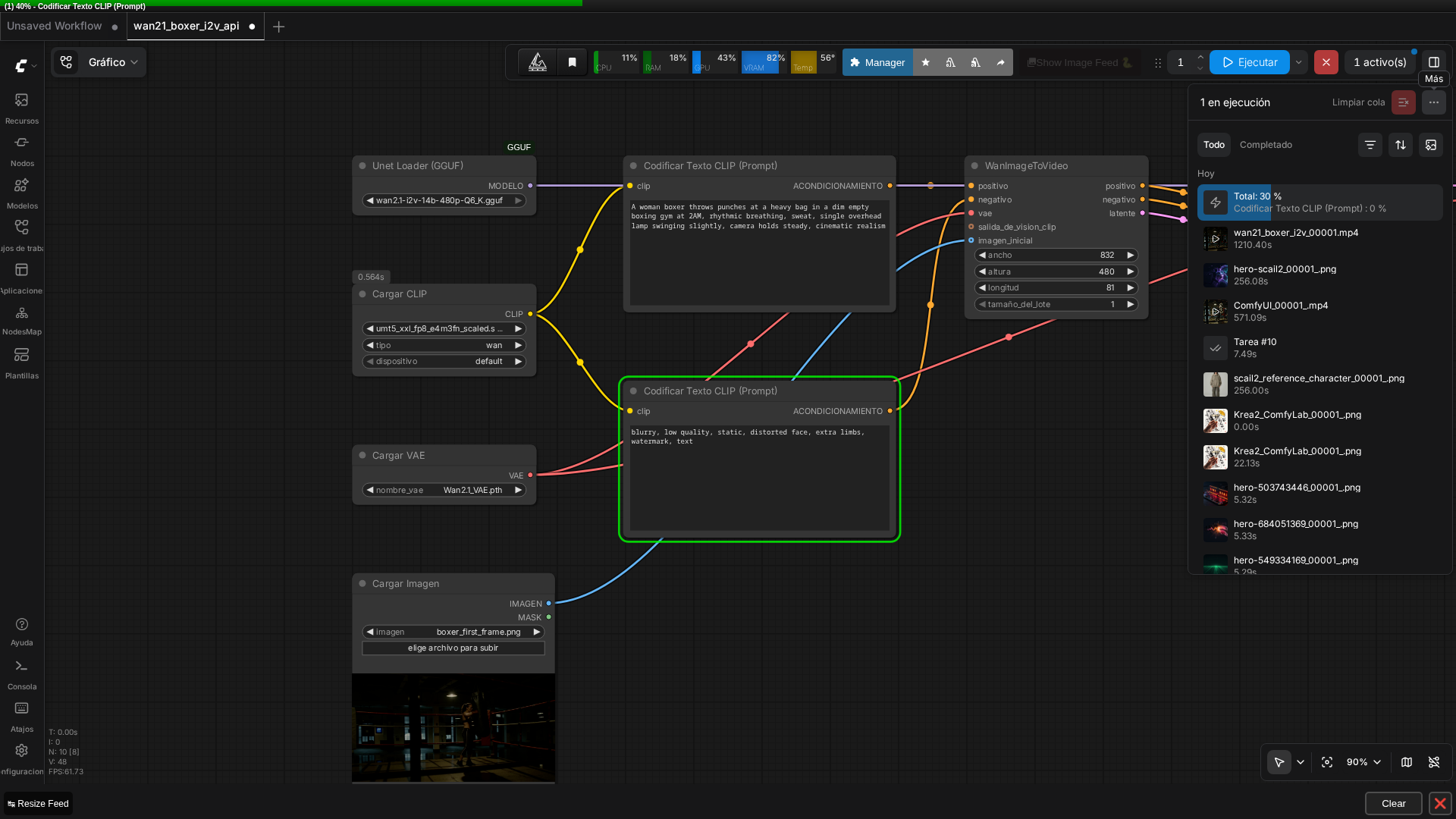 Real screenshot of the graph running in ComfyUI v0.27.0, loaded directly from the API-format JSON via Ctrl+O.
Execution Performance: 20 Minutes on RTX 3090
The workflow ran cleanly on the first attempt. No crashes, no validation errors, no mid-execution fallbacks to CPU.
Total execution time: 20 minutes 10 seconds (1,210 seconds).
For context, the original LTXV-2.3 test (text-to-video, comparable length) completed in 463 seconds. A separate SCAIL-2 character-replacement test finished in 571 seconds. Wan 2.1 I2V was noticeably slower—roughly 2.6× the LTXV-2.3 time.
This test didn’t isolate why — step count (20 vs. LTXV distilled’s 8), model architecture, or both could be contributing, and there’s no data here to attribute the gap to one specific factor. What’s clear from the output itself: the trade-off bought tighter consistency with the source image and predictable motion, which matters when you’re animating an existing frame rather than generating from scratch.
Output Quality and Coherence
The final video was 832×480, 16fps, 5.06 seconds (81 frames), h264, no audio track.
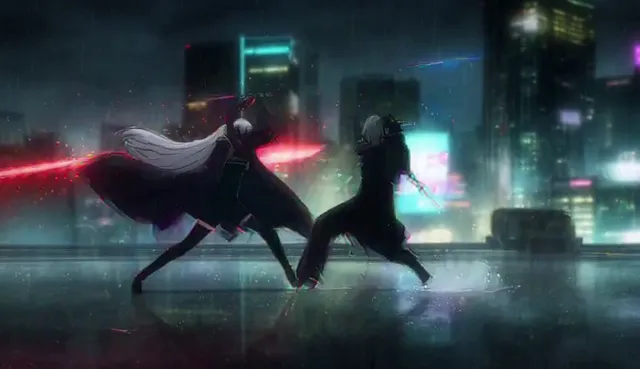
Real video generated with this exact workflow, starting from the LTXV-2.3 test’s first frame.
Unlike LTXV-2.3, which generates synchronized audio as part of its joint audio/video latent, Wan 2.1 I2V here outputs video only. If audio is required, you’d need to generate or source it separately.
Going frame by frame, the result is recognizable but noticeably lower quality than the other two tests in this series. Identity held up: the boxer’s hair, outfit, and gym setting stayed consistent across all 81 frames. But the punching bag loses definition and shifts slightly in shape and size between frames — not a severe artifact, but visible if you compare it directly against the LTXV-2.3 or SCAIL-2 output. The motion itself is also more subtle than expected: the boxer shifts weight and adjusts stance, but there’s no clear, decisive punch landing on the bag the way the prompt described.
Part of this is likely resolution: 832×480 here versus 1920×1024 for LTXV-2.3 or 896×512 for SCAIL-2. This test didn’t isolate how much of the softness comes from the lower resolution versus the model itself or the settings used — both are plausible and there’s no data here to separate them. What can be said with confidence from watching the output: this particular Wan 2.1 I2V configuration didn’t match the visual quality of the other two tests in this series.
💡 Tip: Image conditioning locks identity and spatial consistency across the entire video, eliminating the drift risk present in text-only generation.
Settings Used: Standard Defaults, Not Optimized
The KSampler settings were:
- Steps: 20
- CFG: 6.0
- Sampler: uni_pc
- Scheduler: normal
- Denoise: 1.0
- Seed: 203598512577918 (same as the original LTXV-2.3 test, for maximum comparability)
These are standard, commonly-recommended Wan 2.1 defaults for image-to-video work. I’m reporting them as the settings that produced the output, not claiming they’re optimal or superior to other choices.
Practical Considerations: When to Use Wan 2.1 I2V vs. LTXV-2.3
| Scenario | Best choice | Why |
|---|---|---|
| Generate video from text prompt alone | LTXV-2.3 | Faster, includes audio, higher resolution |
| Animate an existing image or frame | Wan 2.1 I2V | Tight image consistency, predictable motion |
| Extend or continue previous footage | Wan 2.1 I2V | Extract frame → animate naturally |
| Maximize speed on RTX 3090 | LTXV-2.3 | 2.6× faster execution |
| Prioritize identity/spatial lock | Wan 2.1 I2V | Image conditioning prevents drift |
| Need synchronized audio | LTXV-2.3 | Joint audio/video latent generation |
Both run cleanly on an RTX 3090 with standard ComfyUI setup. Both are quantized and available locally, no cloud API required.
FAQ
Q: Does Wan 2.1 I2V generate audio like LTXV-2.3?
A: No. This test’s output was video-only, no audio track. LTXV-2.3 generates synchronized audio as part of a joint audio/video latent; Wan 2.1’s image-to-video pipeline tested here doesn’t include an audio component.
Q: Do I need the WanVideoWrapper custom node for Wan 2.1 I2V in ComfyUI?
A: No. This test used only ComfyUI-GGUF (for loading the GGUF-quantized model) and comfyui-videohelpersuite (for video export). The Wan-specific conditioning node, WanImageToVideo, is native to ComfyUI core—no third-party Wan-specific node pack required.
Q: Can I load an API-format ComfyUI workflow JSON with Ctrl+O?
A: Yes, at least in ComfyUI v0.27.0—the frontend accepted a flat API-format prompt JSON directly via Ctrl+O and auto-generated the visual node graph, without needing the full UI-format JSON with explicit node positions and link arrays.
Keep Reading
If GGUF quantization and VRAM planning is unfamiliar, our GGUF models in ComfyUI guide covers the trade-offs. For the original text-to-video source of this test’s starting frame, see our LTXV-2.3 + RTX Super Resolution walkthrough. And if you want to scale the output resolution up, our ComfyUI upscale workflow covers a tested Ultimate SD Upscale setup. If you want to see how Wan 2.2 handles this exact same frame, check our Wan 2.2 vs Wan 2.1 quality test. If you want actual camera control instead of relying on the prompt, we tested Uni3C ControlNet for Wan 2.1 on the same RTX 3090. This test is one of five in our real local AI video comparison on one RTX 3090, with all five runs benchmarked side by side.
Our Recommendation
🏆 Choose Wan 2.1 I2V if:
- You have a specific starting image or frame you want to animate
- Identity consistency and spatial lock are non-negotiable
- You can tolerate 20+ minutes of generation time
- You’re extending existing footage or iterating on a visual concept
🏆 Choose LTXV-2.3 if:
- You’re generating video from a text prompt with no reference image
- You need synchronized audio as part of the output
- Speed and higher output resolution (1920×1024) matter more than image anchoring
- You want to complete a generation in under 8 minutes
For most workflows, having both installed is ideal: LTXV-2.3 for rapid text-to-video ideation, Wan 2.1 I2V for controlled image-to-video refinement. On an RTX 3090, the combined VRAM footprint is manageable, and the complementary strengths cover nearly every video synthesis scenario.
Next steps in ComfyUI
Getting started
More video and image AI workflows
- Wan 2.2 in ComfyUI: image-to-video Dual-model MoE architecture, VRAM requirements and real output.
- HunyuanVideo 1.5 in ComfyUI Real install of the I2V 480p step-distilled variant on an RTX 3090.
- 5 local AI video models tested on one RTX 3090 LTXV-2.3, SCAIL-2, Wan 2.1 and Wan 2.2, all benchmarked on the same hardware.
FAQ
- Does Wan 2.1 I2V generate audio like LTXV-2.3?
- No. This test's output was video-only, no audio track. LTXV-2.3 generates synchronized audio as part of a joint audio/video latent; Wan 2.1's image-to-video pipeline tested here doesn't include an audio component.
- Do I need the WanVideoWrapper custom node for Wan 2.1 I2V in ComfyUI?
- No. This test used only ComfyUI-GGUF (for loading the GGUF-quantized model) and comfyui-videohelpersuite (for video export). The Wan-specific conditioning node, WanImageToVideo, is native to ComfyUI core -- no third-party Wan-specific node pack required.
- Can I load an API-format ComfyUI workflow JSON with Ctrl+O?
- Yes, at least in ComfyUI v0.27.0 -- the frontend accepted a flat API-format prompt JSON directly via Ctrl+O and auto-generated the visual node graph, without needing the full UI-format JSON with explicit node positions and link arrays.