When a new community node drops for ComfyUI, the first 48 hours usually tell you whether it’s production-ready or a learning experience. I cloned the WhatDreamsCost-ComfyUI repo the same day Tensor Alchemist published his LTX Director tutorial, loaded the workflow from his video description, and hit a wall: five validation errors. Then I got past those and hit another wall: a runtime crash with a confusing error message about missing timeline segments. Both bugs are real, both are documented below, and both have fixes you can apply today.
The LTX Director in ComfyUI is powerful—but version stability is its weak point. Here’s what went wrong, why it happened, and how to fix it.
At a Glance: LTX Director Bug Summary
| Issue | Symptom | Root Cause | Fix |
|---|---|---|---|
| Version incompatibility | 5 validation errors on workflow load | Schema breaking change (June 20, 2026) | Pin repo to commit e4db1fc |
| Missing prompt error | RuntimeError on empty timeline | split('') returns [''] not [] | Add at least one text segment via UI |
| Audio sync | Audio present but timing unclear | Automatic; no separate step needed | Connect LTXVAudioVAELoader |
What Is LTX Director, and Why It Matters
LTX Director is a community custom node—part of the WhatDreamsCost-ComfyUI package—that wraps Lightricks’ LTX video model (LTXV-2.3) with timeline-based control. Instead of generating a single video from one prompt, you get:
- Multiple text prompts chained across a timeline to control scene transitions
- Image-to-video with multiple reference images at specific frame ranges
- Lip-sync to text when you supply a voice
- Short films with frame-accurate prompt switching
The node handles video generation, audio synthesis, and VAE encoding/decoding in one interface. For a 1600×896, 30fps, 9.9-second video with audio, it’s genuinely impressive—the WhatDreamsCost team abstracted away a lot of the plumbing.
But abstraction without version stability becomes a liability. The LTXV-2.3 timeline control system is elegant until a schema change breaks your workflow.
👉 Quick takeaway: LTX Director simplifies multi-scene video generation into one node, but you need to understand its version history and timeline requirements to avoid runtime crashes.
Bug #1: The Version Incompatibility That Broke the Workflow
What Happened
I downloaded the workflow JSON from a tutorial video and loaded it into ComfyUI. Graph validation failed immediately with five errors:
| Error | Node/Field | Root Cause |
|---|---|---|
Value 0 smaller than min of 1 | LTXDirector, divisible_by | Parameter range changed |
Failed to convert an input value to a FLOAT value | frame_rate receiving ‘frames’ | Widget type mismatch |
Failed to convert an input value to a INT value | custom_width receiving None | Schema reordering |
Value not in list | display_mode receiving 1600, resize_method receiving 18 | Enum values shifted |
Return type mismatch between linked nodes | frame_rate expecting FLOAT but receiving MOTION_GUIDE_DATA | Output type changed |
These weren’t typos. They were schema breaking changes baked into the LTX Director node itself.
Why It Happened
I traced the issue through Git history. The culprit: a major update on June 20th that restructured the LTXDirector node’s widget schema—adding new fields, reordering existing ones, and changing parameter types. The video was published before that date. The workflow was now incompatible with the code.
This is the core problem with LTX Director bug reports: they often stem not from logic errors but from version mismatches between when a workflow was created and when the node’s schema changed.
📌 Keep in mind: Community nodes can ship breaking changes without semantic versioning. Always note the publish date of any workflow you download.
The Fix
Revert the repo to the last compatible version before the schema change:
cd WhatDreamsCost-ComfyUI
git checkout e4db1fc -- .
Commit e4db1fc corresponds to the “v1.3.3 Fixed errors due to audio encoding. Fixed minor widget issue.” commit message from May 15th — the repo has no formal release tags, so pinning by commit hash is the only option. After reverting, the same workflow JSON loaded with zero validation errors.
Starting fresh? Use the latest version and rebuild workflows from scratch. Only revert if you need to load old workflows.
🏗️ Workflow: LTX Director (Mars astronaut, text-to-video with audio)
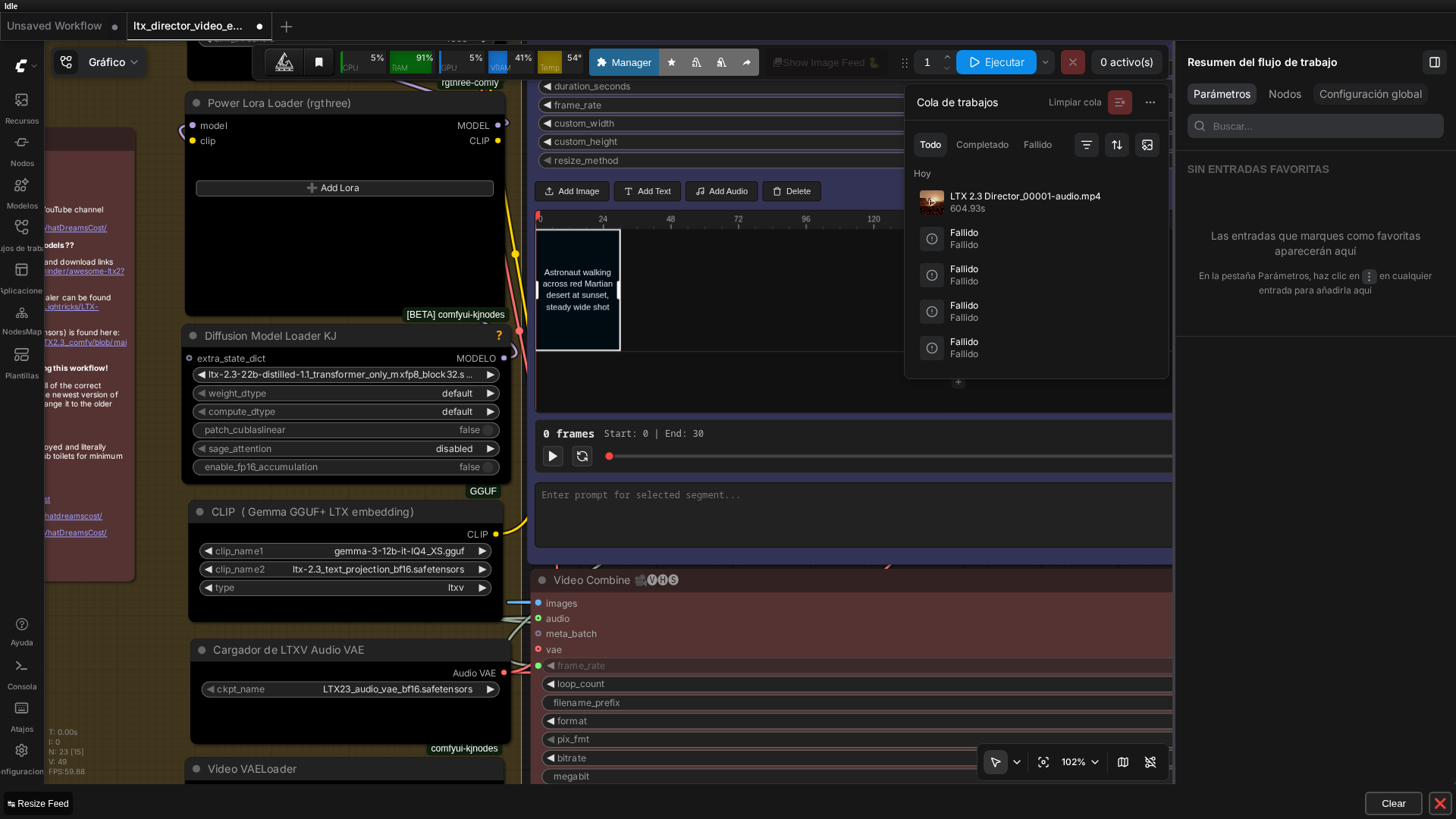 Real screenshot of the graph in ComfyUI v0.27.0, showing the LTX Director node, the timeline editor, and the job history with the completed run (604.93s).
Bug #2: The “Missing Prompt” Error on Empty Timeline
What Happened
With the compatible node version installed, I tried to generate using only the global_prompt field—the simplest text-to-video-with-audio mode. No timeline blocks created, just a single text input and a generate button. The node crashed at runtime:
ValueError: There is a segment on the timeline missing a prompt!The error message confused me. I hadn’t created any segments.
Why It Happened
The LTXDirector node’s _encode_relay function contains this line:
local_prompts.split('|')When local_prompts is an empty string (''), Python’s split() doesn’t return an empty list—it returns a list with one empty element: ['']. The code then iterates through that list checking for empty prompts. That single empty element triggered the validation error, even though no real segment existed.
This is a genuine bug in the node’s input validation logic: an empty string isn’t handled as “zero segments” before the check runs.
⚠️ Important: The node requires at least one text block in the timeline editor, even if your intent is global-prompt-only generation. This is a design constraint, not a user error.
The Fix
You need to add at least one timeline segment with a real, non-empty prompt using the UI:
- Click the “Add Text” button in the timeline editor (visible in the ComfyUI node UI)
- Type an actual prompt into that segment — leaving it blank reproduces the exact same error
- Execute the workflow
global_prompt itself can be set directly (as a widget value or via script) without issues — that part worked fine in this test. It’s specifically local_prompts and segment_lengths that only get written correctly when a segment is created and committed through the timeline editor’s own logic; setting those two fields directly, bypassing the editor, did not take effect.
The Test Workflow and Results
I used a standard configuration to verify both bugs and test the node’s actual performance:
- Model chain: DiffusionModelLoaderKJ (distilled mxfp8) → DualCLIPLoaderGGUF (gemma-3-12b) → VAE loaders (video + audio)
- LTX Director: global_prompt + one timeline segment with the same prompt
- Sampling: KSamplerSelect (euler_ancestral, 8 steps, cfg 1.0, seed 12)
- Output: LTXVSeparateAVLatent → VAEDecodeTiled (video) + audio decode → VHS_VideoCombine
Prompt used: “A lone astronaut walks across a vast red Martian desert at sunset, dust swirling around the boots, distant rocky mesas silhouetted against an orange sky, cinematic wide shot”
Hardware: RTX 3090 (24GB VRAM)
Output specs: 1600×896, 30fps, 9.9 seconds, with synchronized AAC audio (generated by the model, no separate audio step)
Execution time: 10 minutes 4 seconds (604.93 seconds total)
Visual quality: Coherent and cinematic. The astronaut walks toward the sun with realistic dust kicking up. Rocky mesas are visible in the background. The color grading matches the sunset-on-Mars aesthetic. Audio is present and synchronized.
Real video generated with this exact workflow: an astronaut crossing the Martian desert at sunset, with synchronized audio.
💡 Tip: With an Audio VAE connected, LTX Director generates synchronized audio automatically in the same pass — no separate audio-generation step needed.
Key Findings
Once you work around the two bugs, this single test produced a coherent, cinematic result on consumer hardware. One data point isn’t enough to call 10 minutes per 10-second clip “typical” for this model size — it’s just what this specific run took on this RTX 3090.
What This Test Did Not Cover
This test used LTX Director’s simplest mode: a single text-to-video segment. The node’s real differentiating feature—what makes it special—is LTXV-2.3 timeline control across multiple chained prompts, or image-to-video with multiple reference images placed at specific frame ranges.
Those advanced use cases remain untested. A follow-up focused on multi-segment scene transitions or image-guided video generation would reveal whether the node’s core promise—frame-accurate control over long-form video generation—holds up in practice.
One Concrete Takeaway on Community Nodes
The WhatDreamsCost-ComfyUI repo has no release tags — pinning to a specific version means pinning to a commit hash, not a semantic version number. That’s not a criticism of the project (it’s a fast-moving, actively maintained community tool, and the maintainer ships real fixes quickly), but it does mean any workflow JSON you download alongside a tutorial video can silently stop working weeks later if the node’s schema changes. Always check the video’s publish date against the repo’s commit history before assuming a “broken” workflow is your fault.
FAQ
Q: Why does an LTX Director workflow downloaded from a YouTube video fail to load?
A: Most likely a custom node version mismatch. The LTX Director node (WhatDreamsCost-ComfyUI repo) had a 2.0 update on 2026-06-20 that changed the widget schema, breaking compatibility with workflows saved before that date. Check the video’s publish date, and if it’s older, pin the custom node to a commit before that update.
Q: Why do I get ‘There is a segment on the timeline missing a prompt!’ when I haven’t created any segment?
A: It’s a real bug in the node: when local_prompts is empty, the Python code does local_prompts.split(’|’), which on an empty string returns a list with one empty element, and that entry triggers the ‘segment missing a prompt’ check. Fix it by explicitly adding at least one text block on the timeline (the ‘Add Text’ button), even if you only want to use the global prompt.
Q: Does LTX Director generate audio automatically?
A: Yes, if you connect an Audio VAE to the node (LTXVAudioVAELoader in this workflow). The audio comes out synchronized with the video without needing a separate audio-generation step.
Q: Can I automate LTX Director instead of clicking through the UI?
A: Yes, but not by setting local_prompts or segment_lengths directly — those only take effect when written through the timeline editor’s own commit logic. In this test, calling the editor’s internal JavaScript methods directly (creating a segment, setting its prompt, then committing) worked reliably. global_prompt alone can be set as a plain widget value without any of that.
Keep Reading
For the original LTXV-2.3 distilled test this workflow builds on, see our LTXV-2.3 + RTX Super Resolution walkthrough. If you’re curious how the same model behaves without distillation, our LTX-2.3 dev-model OOM investigation documents a reproducible crash on this same hardware. And for more on how quantized text encoders like the gemma GGUF used here work, our GGUF models in ComfyUI guide covers the basics. LTXV-2.3 is also one of five models in our real local AI video comparison on one RTX 3090, tested alongside SCAIL-2, Wan 2.1, and Wan 2.2.
Next Steps
If you’re planning to use LTX Director:
- Pin the repo commit to a known working version. Don’t assume latest = stable.
- Create at least one timeline segment, even for simple text-to-video generation. Use the UI’s “Add Text” button.
- Test your workflow immediately after cloning the repo. Schema changes can happen between publish dates.
- Consider multi-segment workflows as your next step—that’s where LTX Director’s real power emerges, and where a dedicated follow-up test would be valuable.
🏆 Our recommendation
If you’re building a single-scene text-to-video workflow and want automatic audio sync → use LTX Director with the latest version and accept the UI requirement for at least one timeline segment. If you need to load workflows from May–June 2026 → pin to commit e4db1fc. If you’re planning multi-scene films with frame-accurate prompt switching → LTX Director is the right tool, but test your timeline setup early and document your repo commit for team reproducibility.
The node works once you know about these two issues, and both fixes are straightforward once you understand the cause.
Next steps in ComfyUI
Getting started
More video and image AI workflows
- Wan 2.2 in ComfyUI: image-to-video Dual-model MoE architecture, VRAM requirements and real output.
- HunyuanVideo 1.5 in ComfyUI Real install of the I2V 480p step-distilled variant on an RTX 3090.
- 5 local AI video models tested on one RTX 3090 LTXV-2.3, SCAIL-2, Wan 2.1 and Wan 2.2, all benchmarked on the same hardware.
FAQ
- Why does an LTX Director workflow downloaded from a YouTube video fail to load?
- Most likely a custom node version mismatch. The LTX Director node (WhatDreamsCost-ComfyUI repo) had a 2.0 update on 2026-06-20 that changed the widget schema, breaking compatibility with workflows saved before that date. Check the video's publish date, and if it's older, pin the custom node to a commit before that update.
- Why do I get 'There is a segment on the timeline missing a prompt!' when I haven't created any segment?
- It's a real bug in the node: when local_prompts is empty, the Python code does local_prompts.split('|'), which on an empty string returns a list with one empty element, and that entry triggers the 'segment missing a prompt' check. The fix is to explicitly add at least one text block on the timeline (the 'Add Text' button), even if you only want to use the global prompt.
- Does LTX Director generate audio automatically?
- Yes, if you connect an Audio VAE to the node (LTXVAudioVAELoader in this workflow). The audio comes out synchronized with the video without needing a separate audio-generation step.